Chapter 1. Introduction to text analysis
Despite the many things that computers can do – including many things that humans cannot (easily) do – computers are not intelligent. All of the power of computers flows from the fact that they can do things very fast, and with vast amounts of data.
This is true even for artificial intelligence (AI) applications, such as large language models (LLMs), which is the technology that AI chatbots and agents are based on. These systems create an appearance of intelligence, but at their core is just very fast processing of very large amounts of data.
1.1. The superpower of computers: speed
The incredible speed of computers can be used to achieve many very different things. In the first volume of this book series, we have seen how it can be used to create graphical games: the computer can draw an image consisting of many, many pixels, then draw it again slightly differently, and then again, so fast that it appears to us as smooth motion. Animation is just an optical illusion: it is a series of still images drawn so quickly that we cannot recognise the individual images.
You will likely have seen some professional computer games, possibly including three-dimensional representations of imaginary worlds and complex interactions of game characters. Those examples show you even more clearly how fast computers are: they compute complicated models of a three-dimensional scene and display these on screen so quickly that we see it as smooth animation.
Ultimately, this effect is based just on the fact that the computer can hold vast amounts of data (thousands of game objects, millions of pixels) and can process them very quickly.
The same is true for any other of the many things that computers can do. You see examples of the amount of data and the computer’s speed when a search engine searches hundreds of millions of webpages in fractions of a second, or when an online map can show you details of any place in the world almost instantaneously.
One specific area which makes use of the memory size and speed of computers is data science. We will now have a closer look at this topic, and especially at a specific sub-field: text analysis.
1.2. Data science and text analysis
Data science is a field that is concerned with gaining insights from large amounts of data. It usually combines techniques from statistics, computer science and visualisation to extract meaning out of data sets that are too big to analyse without computers.
The actual data can be many different things: data science can be used to analyse healthcare data to predict disease risks, or it can be used to analyse traffic and transport data to improve planning of public transport systems. Equally, it could be used to analyse financial data to detect online fraud, or environmental data to make climate or weather predictions.
A sub-field of data science is text analysis. This is one of the earliest examples of data science techniques, and it uses text documents as the data to be analysed. This might be used, for example, by historians to classify large amounts of ancient scanned documents, or it could be used by political scientists to analyse public opinion by scanning online comments.
In this chapter, we will start looking at some examples of simple text analysis to get a feel for how this works. Doing this, we will practice some important Python programming concepts and gain a first insight into data science.
1.3. Working with strings
The Python string type (usually abbreviated to str in the documentation) stores text strings. Text strings are just sequences of characters of any length. Thus, you can store your name in a string, or much longer pieces of text. In one extreme, a string might be empty (a text string of length zero), or it may hold the entire text of a Harry Potter book.
 String variables store text. The text can be of any length: it may hold just a few characters, or the text of a whole book.
To get started with text analysis, we essentially have to get proficient with working with strings.
1.4. Counting characters
One of the simplest things we can do with the string is to count the number of characters in it. We will do this – and a number of other exercises – using a simple starter project called text-analysis.
Exercise 1.1 Open the text-analysis project from the book projects. (If you are reading on screen, clicking on the project name in the previous sentence should open the project. If you are reading on paper, open Strype, and then find the project in the "Book…" section in the Strype menu.) When you run the project, you will notice that it produces no output. Add a statement at the end to print out the content of the text variable.
Exercise 1.2 Change the content of the data string to your own name. Run the program again.
We can very easily count the number of characters in a string using Python’s built-in len() function. Calling this function with a string as a parameter is straightforward:

number_of_characters = len(text)In this statement, we call the len function with a string parameter, and the function returns a number of type int to us. Here, we store that number into a variable.
Exercise 1.3 Add code to your program to count the number of characters in your name and print out the result.
The len() function can be used to count the length of a string (the number of characters). len() is a built-in function that is always available; it does not need to be imported.
1.5. Formatting output
If we want to format text output in a specific way, we have several options that give us various levels of control over the exact appearance. Assume we want to embed the number of characters in the middle of a sentence. The intended output of our program might be:
Wolfgang Amadeus Mozart
The string contains 23 characters.
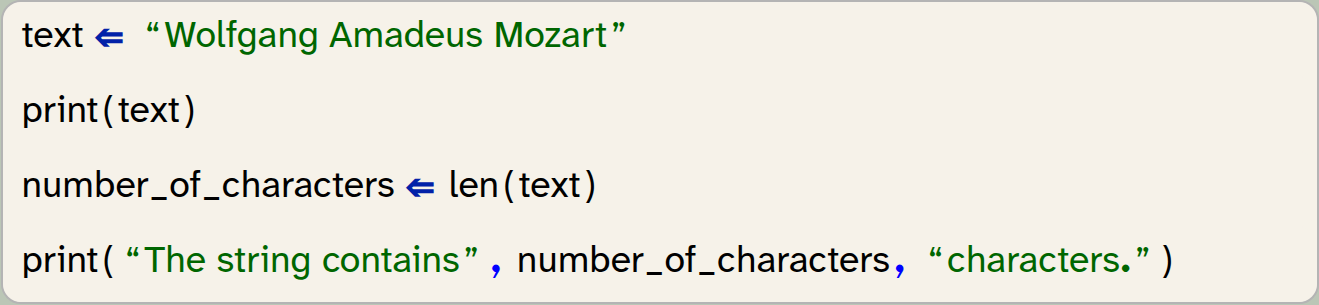
We might write:
text = "Wolfgang Amadeus Mozart"
print(text)
number_of_characters = len(text)
print("The string contains", number_of_characters, "characters.")
Here we can see two things: The first is that spaces are also characters. The string "Wolfgang Amadeus Mozart" does indeed consist of 23 characters, not 21, because each of the two spaces is also counted. For a computer, a space is just a character like any other.
The second thing to note is that the print statement accepts multiple parameters, separated by commas, and it will print out each parameter, on the same line.
Exercise 1.4 Experiment with using the print function with different parameter lists. Try, for example, print(1, 2, 3) and print(text, "text").
From this exercise we can see that the parameters to the print functions can be literals (strings or numbers), or they can be the names of variables. We could also write a function call directly into the print function. Let us consider these two lines from the previous code snippet:

number_of_characters = len(text)
print("The string contains", number_of_characters, "characters.")
If we do not need the number of characters again later, we can achieve the same task without the variable:

print("The string contains", len(text), "characters.")In this version, the len() function is called as part of evaluating the parameter list of the print() function, and the value it returns is passed straight to the print() function without assigning it to a variable. This is a perfectly valid alternative achieving the same goal.
One limitation when using this version of the print() function is the automatic insertion of spaces. If you paid close attention, you will have noticed that the print() function automatically added a space between each of its parameter outputs (before and after the number, in our example). What if we wanted our output in a slightly different format:
Wolfgang Amadeus Mozart
Length: 23.
If it is important to us to have the period after the number, then we now have a problem: Simply writing

print("Length: ", len(text), ".")does not do the trick, because it inserts a space between the number and the period. We might ignore the problem, because it does not seem terribly important. However, in some cases we care about the exact format of the output, and we want to have full control. For those cases, we can use an alternative mechanism: formatted strings (sometimes also called f-strings by Python programmers). We can write the following:

print(f"Length: {number_of_characters}.")Note the character f before the string. Adding this prefix, the string becomes a formatted string, and it can now include placeholders in parentheses: { }. Between these parentheses, we can write the name of a variable, and the placeholder will be replaced by the value of the variable. It is also allowed to insert a call to a function (or any other expression) directly in the placeholder, and the resulting value will be inserted:

print(f"Length: {len(text)}.")A formatted string can include any number of placeholders, and the programmer is in full control of the formatting and spacing of the resulting string.
Exercise 1.5 Rewrite the output of the length of the string in your program using a formatted string.
Exercise 1.6 Formatted strings can be used for more sophisticated formatting than we have discussed here. Find out about additional formatting options on the internet: do a web search for "Python f-strings" or "Python formatted strings" and find at least two other formatting options that are provided. Write them down.
A formatted string (f-string) can be used to include values from variables or computed values within a string. It also offers more detailed formatting options.
1.6. Processing individual characters
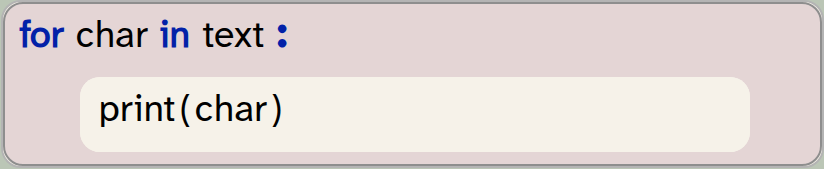
The next thing we might want to do is to access the individual characters in our string one character at a time. This, too, is fairly straightforward. We can use a for-loop:
for char in text:
    print(char)
In this example, we assume that the variable text holds our string. In the for-loop, we declare a variable called char to be used as our loop variable. The for-loop will assign each character of the string to the char variable in turn, and execute the loop body once for each character. Here, we just print out the character, but we could of course add more code in the loop body for more sophisticated processing.
A for-loop can be used to iterate over the characters in a string.
Exercise 1.7 Add the for-loop to your program as shown above. Test your program.
The project with the changes discussed thus far is available in the book projects as text-analysis-v2.
1.7. A first analysis: character statistics
Now that we know how to access and process characters in a string, we can start with some simple analysis. As a first step, we would like to print out information in the following format:
Text: "It was a bright cold day in April, and the clocks were striking thirteen."
Length: 74 characters
Characters without spaces: 60
Number of punctuation characters: 2
You can make a start towards this with the following exercises.
Exercise 1.8 From your existing program, remove the loop that prints out the individual characters. Write or copy/paste a sentence to be analysed and assign it to your text variable. Run your program to test.
Exercise 1.9 Modify the remaining code to produce the first two lines shown above. Make sure the format is exactly as shown there.
In the last exercise, you may have encountered a small issue: We would like to print out double-quotes around the actual text. Since we have used double-quotes to identify the string literal itself, we cannot simply write a double quote inside the string. If we tried to use the following string:
"using "quotes" in a string - this does not work"
our program would fail, because the quotes intended to be within the string end the string itself, and we end up with invalid Python code. There are two possible solutions to this. The first one is to use a different string character. Since Python allows us to enclose strings with either single or double quotes, we can use single quotes to delimit the string if we wish to have double quotes within the string:
'using "quotes" in a string - now it works'
The second solution involves using a special character, the backslash: \. The \ character allows us to insert special characters into a string. Writing \" inserts a double-quote character into a string without ending the string:
"using \"quotes\" in a string - this works as well"
Using this second technique is useful if our string includes both single and double quotes.
Exercise 1.10 Make sure the output of your text is exactly as shown in the example above, including the double-quote characters.
1.8. Identifying spaces
Let us now work on producing the third line: counting the characters that are not spaces.
Counting all characters was very easy, since Python has a function built-in that does the job for us. We only had to call len(text) and we were done. If we want to count the non-space characters, life is not quite so easy: Python does not have a ready-made function for this, so we have to do the counting ourselves.
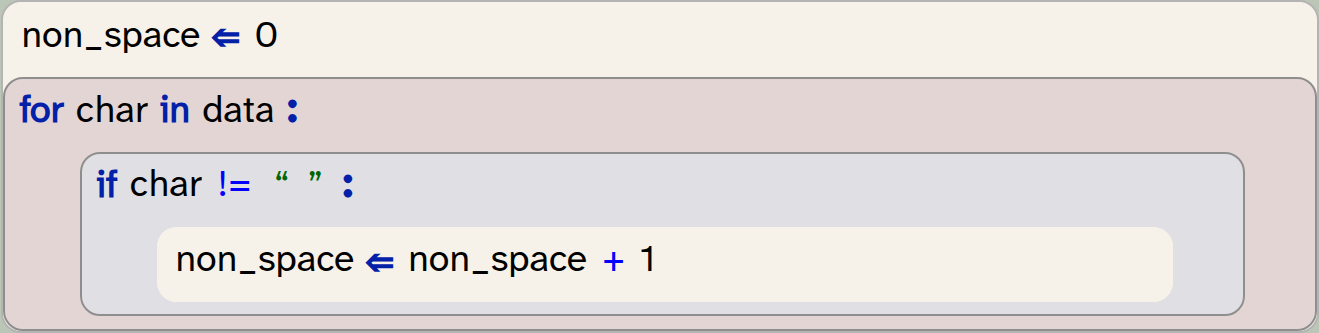
We can do this by looping through all the characters in the string (we have done this before), looking at each character, and counting all the non-space characters. For the counting, we need to use a variable that we can increment for each non-space character:
non_space = 0
for char in data:
    if char != " ":
        non_space = non_space + 1
In this code, we first initialise a counter variable to 0. We do this so that we can increment this variable for each non-space character that we find, thus counting the characters. Note that we have named the counter variable non_space – it is always good practice to name the variable as precisely as possible to express what we are using it for. This name indicates quite clearly what we are counting with this variable.
We then write a for-loop to go through all the characters of our string, as before. But this time we have an if-statement in the body of the loop: We check whether the character is "not equal to" a space, and if this is true, we increment our variable.
Two things are worth noting here:
-
The operator
!=means "not equal". So the conditionchar != " "will be true if the variablecharis not equal to the space character. You can see a list of all Python operators in Appendix A: Python operators. -
The line
non_space ⇐ non_space + 1increments the variablenon_spaceby one. Since in an assignment the right hand side is evaluated first, this statement reads the current value ofnon_space, adds 1 to it, and then writes the result back into the same variable.
Exercise 1.11 In your own program, implement this functionality: Print out how many non-space characters your text contains.
1.9. Identifying punctuation
We can write similar code to count the punctuation characters. Again, we use a for-loop that iterates through the characters in our text, looking at each character in turn. The main difference is that we now need to check this character against a whole group of other characters.
We can do this by first creating a string that includes all punctuation characters we wish to recognise:

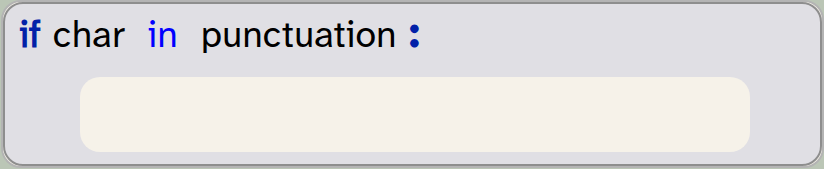
punctuation = ".,/-?;:"In the condition of the if-statement (inside the loop), we now check whether the current character is contained in our punctuation string:
if char in punctuation:
   pass
The in operator checks whether the character is included in the string, and returns True if it is.
Exercise 1.12 Implement the counting of punctuation characters in your own program. You can start by copying the counting of non-space characters and then making the modifications discussed above. Make sure to give your variables appropriate names!
One other small improvement we can make is to use a more complete set of punctuation characters. Luckily, we do not need to find out what they are and type them all in ourselves – Python already has a string variable with all punctuation characters in it. This variable is called punctuation and is defined in a separate module called string. We can use it by importing it from the string module:

from string import punctuationWhen you add this import to your program, you should remove your own definition of the punctuation string. Your program will now use the complete set of punctuation as defined by Python.
Exercise 1.13 Make the changes discussed above to import and use the pre-defined punctuation string. Test to make sure your program works again.
Exercise 1.14 Print out the punctuation string to see what characters it contains. How many characters are in it? (Then remove this print statement again from your program.)
Exercise 1.15 Test your program with a few different sentences. Does it count correctly?
1.10. Better structure: using functions
If we want our program to be able to easily do this analysis for different texts, we can now move our code into a function which we can call repeatedly, with different text as a parameter.
Exercise 1.16 Define a new function, called analyse_text, that takes one parameter called text. Move all your code that analyses your text from the "My code" section into this function.
Exercise 1.17 In the "My code" section, write a call to your analyse_text function that passes your test sentence as a parameter. Run your program. Make sure that it produces the correct output again.
An example of the project after these changes is in the book projects as text-analysis-v3. Compare your own version with this one. You can see that an advantage of moving your analysis code into a function is that it can now be called multiple times without much effort.
Exercise 1.18 In your "My code" section, add two more calls to your analyse_text function, using opening lines from two books of your choice as parameters.
1.11. Handling files
We have said above that an advantage of using computers is that they can do tasks very quickly, and with amounts of data that we would not want to process by hand. So let’s try this out: Before we go on to count words and sentences, let us first see whether our program can cope with larger text sizes.
Strype has a read-only file system that provides some data files to use with our projects, including the text of some books. One of them is Pride and Prejudice by Jane Austen. The file is a plain text file, accessible at /books/pride-and-prejudice.txt. (This is the full text of the book.)
The project you have been working with includes a helper function called read_file(filename), which you can use to read a file from the file system. This function returns the content of the file as a string. So we can now easily read in this whole book from our file system, and then pass it to our analyse_text function:

text = read_file("/books/pride-and-prejudice.txt")
analyse_text(text) Code completion for data files: The names of the available data files in the built-in Strype file system can be accessed via code completion: Place the cursor inside an empty string (within the quotes in this line):

text = read_file("")and then use Ctrl-Space to invoke code completion. The completion dialogue will show the available data files.
Exercise 1.19 Make the changes discussed above: Instead of using a string literal, read the text file from the file system, and store the text in a variable. Pass this variable to your analyse_text function.
Exercise 1.20 If you have run your program after the previous exercise you will notice that it takes some time to complete. This is because it prints out the complete text to the terminal! With a text of this length, this does not make much sense. Remove the printing of the actual text from your analyse_text function.
Exercise 1.21 Print the title of the text being analysed before its details are printed.
Exercise 1.22 The Strype file system contains the full text of two other books, in the files "/books/war-and-peace.txt" and "/books/winnie-the-pooh.txt". Add the analysis of these two texts to your program.
Exercise 1.23 One small improvement we can make is to print a comma as a thousands separator in our number output. For example, the number 2760512 would then be shown as 2,760,512. In a formatted string, this is easy: If we use the placeholder {number:,} in our f-string (that is: if we add :, after the variable name), then the number will be shown with a thousands separator. Make this improvement for all the number outputs in your own code.
Text files can be read from the file system. The content of a text file is usually provided as a string.
Working with data files in Strype: It may be interesting to use your own data files for use in your Strype projects.
Strype cannot access data files on your local computer. The reason for this is security: web applications running in a browser are not permitted to access your local file system, so Strype cannot read from or write to your own local drive.
There are, however, two ways how you can use your own files for use with Strype: You can upload a file to Strype’s temporary local file system, or you can store your project (and its data files) in an online file system.
How to do this is explained in Appendix C: Working with data files.
1.12. Summary
In this chapter, we have concentrated on two areas. Firstly, we have worked with strings. Strings represent text, and when we can work with strings, we can analyse and manipulate text. Text analysis is a first example of data science, of which we will see a bit more in a later chapter.
In working with strings, we have seen how we can access individual characters and how we can format strings to create output that looks exactly as we would like it to look.
Secondly, we have again seen examples of improving the structure of our code. We have used functions to create a program that is modular and readable. This is important to create code of good quality, as it makes it easier for others reading our code to understand it.
At the same time, we have also seen how to use variables to store values, count and make calculations. This will be of good use in many of our programs in future.

-
String variables store text. The text can be of any length: it may hold just a few characters, or the text of a whole book.
-
The len() function can be used to count the length of a string (the number of characters).
len()is a built-in function that is always available; it does not need to be imported. -
A formatted string (f-string) can be used to include values from variables or computed values within a string. It also offers more detailed formatting options.
-
A for-loop can be used to iterate over the characters in a string.
-
Text files can be read from the file system. The content of a text file is usually provided as a string.

Caesar Cypher
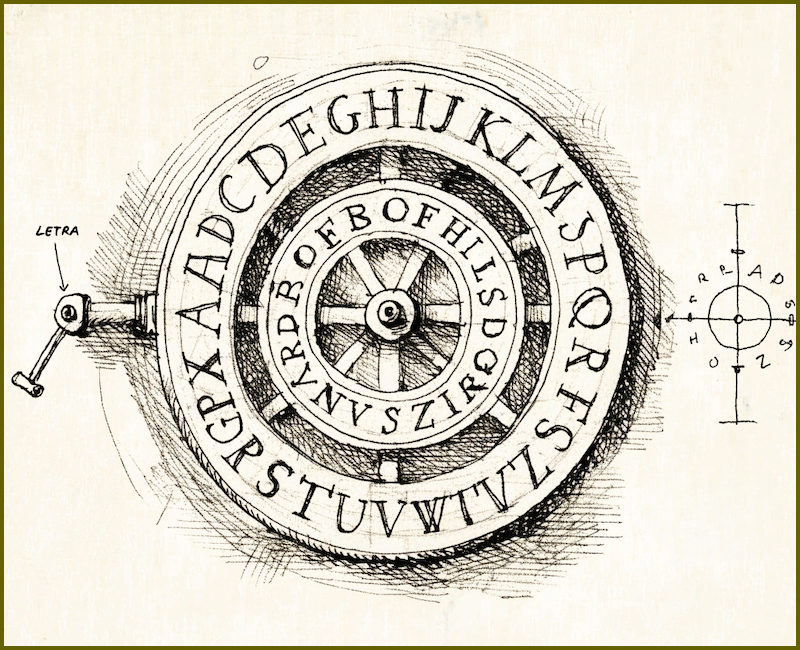
The Caesar Cypher is a very simple encryption technique used to encrypt and send secret messages. It is named after Julius Caesar, who reportedly used it in his correspondence. If you would like to find out more about how it works, do a web search – there is plenty of information online.
The caesar-cypher project is meant to encrypt your messages before sending, and decrypt secret messages you receive. It is, however, incomplete: it can currently only encrypt a single character.
Try the following: extend the project so that it can encrypt a complete text. Then send the text to a friend (who should also work on this program), perhaps by email or text message. When you receive an encrypted response from your friend, decrypt it (using a decrypt function that you also need to write).
If that works, you can also experiment with other shift values: instead of shifting by one character, you can shift by three or seven characters. You could let the user choose by how many characters to shift: a secret key! The key is then needed to decode the message.
You could also extend your program so that you do not need to copy and paste the message into the program text. Instead, your program could read and encrypt an entire file, and write the output to another file.