Chapter 5. Lists in the graphics world
In the previous chapters, we worked with lists of two different element types: we saw lists of strings and lists of numbers (floats). Here, we move on to look at lists of other types: actors, in this case. Doing so will teach us something more about handling lists, and data in general.
We start by looking at a simple graphical game project. In Volume 1 of this book series (Creative Python Programming with Strype, Volume 1:
Getting started with Python), we have seen that our graphics programs deal with actors (objects of the Actor class) to show various elements on screen. Using lists of actors enables us to improve our game.
We will start by looking at a project named Space Rescue.
5.1. The Space Rescue project
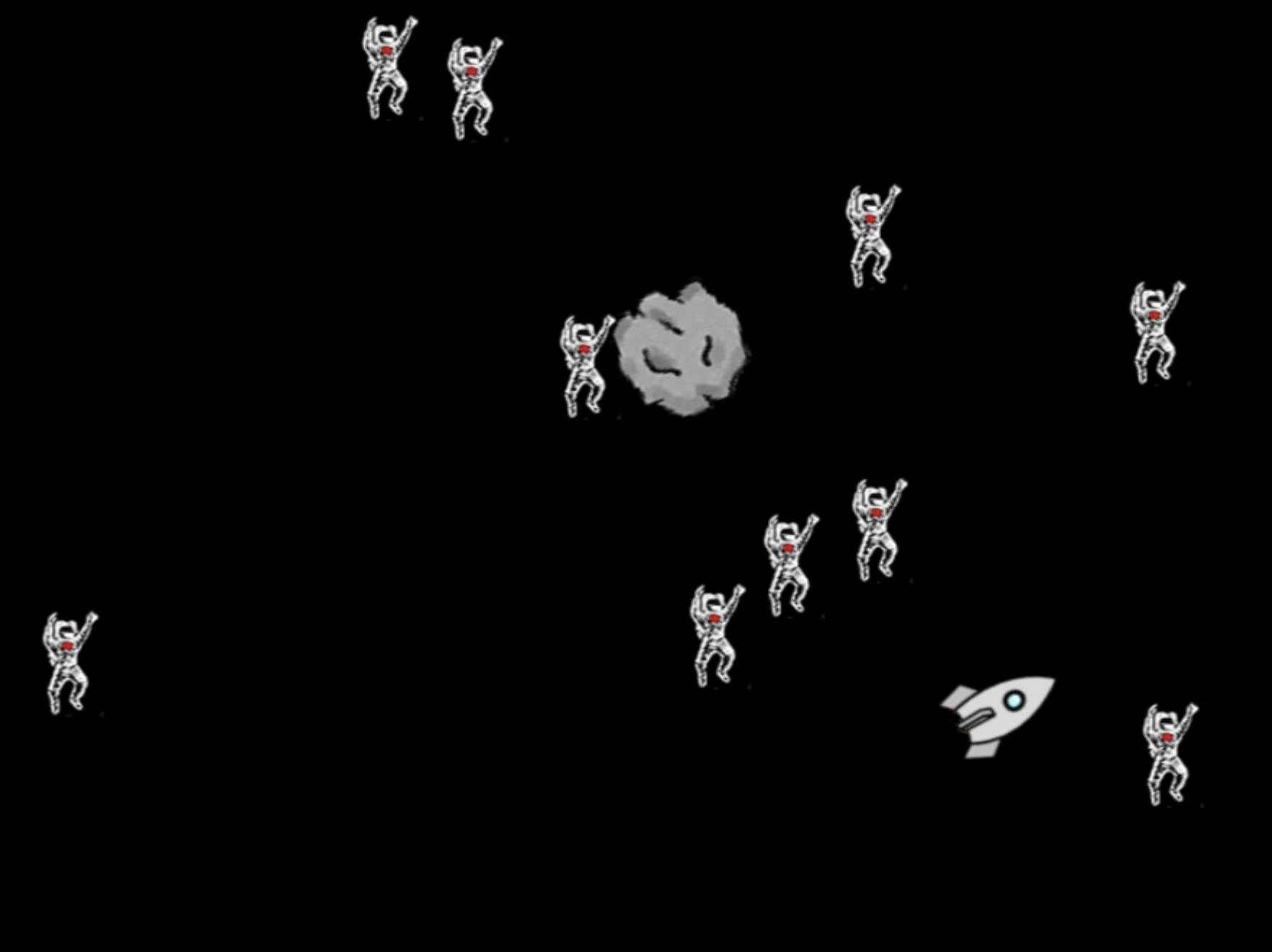
If you have read Volume 1 of this book series, you will quickly realise that the Space Rescue project (Figure 5.3) is essentially a copy of the Yellow Fish game with different graphics. Start by investigating it.
Exercise 5.1 Open the space-rescue game from the book projects. Run the program and investigate it. If you have not seen it before, also open and run the yellow-fish-v6 project from Chapter 7 of Volume 1. How are these two projects similar? How are they different?
This exercise will have shown you that these two programs are quite similar. When moving from Yellow Fish to Space Rescue, we have changed the colour of the background, the graphics and some of the sounds, but the code is almost identical. The only two changes to the functionality are:
-
The asteroid (which previously was the shark), does not turn when it reaches the edge of the screen, but instead appears on the opposite edge.
-
We have added an end-of-game scene that lands the rocket on a planet when the player wins the game.
Exercise 5.2 Examine the source code of the Space Rescue game. Find the place where the behaviour of the asteroid at the edge of the screen is implemented. Make sure that you understand this code. Explain how it works.
Exercise 5.3 Find the code that implements the end-of-game landing scene. What is the function called that implements this?
Exercise 5.4 Does this project use any constructs you are not familiar with? If so, what are they?
5.2. Rotating the astronauts
One small improvement to the game we can now make is to animate the astronauts. Currently, they do not move at all, which makes the scene very static. Since they are floating in space, we might start by making them slowly turn on the spot.
Exercise 5.5 Find the place in the program where the astronauts are created. What variable is the astronaut actor assigned to? Where else is that variable being used?
With the investigation in the previous exercise, you will have seen that the astronaut actor is being created and assigned to a variable, which is then never used. The variable is essentially discarded in our program. This is not a problem: The astronaut actors remain in the game, because they are held in the graphics world, and we can later get them back from there.
Let us prepare our task by initially rotating every astronaut to a different value, so that they are not all facing the same way.
Exercise 5.6 In the loop that creates the astronauts, use the set_rotation(rotation) method of the astronaut actor to assign a random rotation to the actor immediately after it is created. The rotation is specified in degrees, so the random value should be between 0 and 359. (360 would be the same as 0.)
5.3. Lists of actors
We can now make all astronauts slowly turn by calling the turn method on each actor in every step of our main loop. To do this, we first need to get access to our astronauts again. Luckily, this is quite easy: the graphics world maintains a list of all actors in the world, and the strype.graphics library includes a function called get_actors() that can be used to get access to this list. We could, for example, get a list of all actors by simply writing

all_actors = get_actors()The function has an optional parameter to provide a tag. If a tag is provided, only actors tagged with this tag will be returned. If you check the line where we created the astronauts, you will see that we used the tag "astronaut" for each of our astronaut actors, so we can now use this in our function call:

astronauts = get_actors("astronaut")This call will give us a list of all astronaut actors.
 The graphics system maintains a list of actors. We can obtain a list of all actors, or of selected actors, by using the get_actors() function.
Exercise 5.7 Find the get_actors() function in the library documentation. What is the default value of its parameter?
Exercise 5.8 Create a new function move_astronauts() (to mirror the move_rocket() and move_asteroid() functions). The function body can initially be empty. Make sure to call this function from your main loop.
Exercise 5.9 In this new function, use the get_actors() function to get a list of astronauts. Then write a for-loop that iterates over the astronauts list and makes each astronaut turn 1 degree. Test your program. Do the astronauts turn?
Exercise 5.10 Write an appropriate function comment for your new function.
5.4. Working with a list of astronauts
Your astronauts should now be slowly turning while they are floating in space. The next thing that we will add is to make them all re-appear on the surface of the planet after the rocket has landed. One problem with this in our current version is that we do not keep hold of the astronauts after they have been collected – they are essentially deleted as soon as they are collected by the rocket. Therefore, we are not in a position to re-add them into the world. We will first change this by keeping a list of all astronauts, and then we can add them again later.
Exercise 5.11 Add a variable called astronauts and assign an empty list to it. The place to create this variable is at the beginning of the "Definitions" section (where the score variable is also initialised).
Exercise 5.12 In the loop that creates the astronauts, add each new astronaut to the astronauts list.
Now we are in a position where we have kept our own list of all astronauts (independent of whether they were already collected or not), and we can now put them back into the world at the end of the game.
Exercise 5.13 Add a for-loop to the landing function, after the rocket has landed, to add the astronauts from our list back into the world. To place an actor back into the world after it had been removed, you can use the re_add(x, y) method of the actor:

astronaut.re_add(randint(-360,360),randint(-260,260))Choose your values for the randint function so that they are placed at random locations on the surface of the planet.
When you run your program, you will notice that the 10 astronauts all appear at once. This is because the for loop is so quick that we see them all appear at essentially the same time. To make this visually more interesting, we can slow down the execution of this for loop, using the pace function, to make the astronauts appear more slowly, one after the other.
Exercise 5.14 Set the pace of this new for-loop to 5, so that it executes slowly enough for you to see the astronauts appear one at a time.
Exercise 5.15 Add the playing of the click sound (the one that is used when an astronaut is picked up) into this loop. (You can do this by duplicating this line and then dragging it into place.)
A copy of the project with these changes implemented is in the book projects as space-rescue-v2. Compare this project to your own and see how your code differs from ours.
 When you carefully inspect the creation of the astronauts and compare it to the creation of the shrimp in the Yellow Fish project, you might have noticed one further small difference: In the fish version, we wrote:

for count in range(0, 15):
    shrimp = Actor(image_literal,randint(-360,360),randint(-260,260),"shrimp")
while in the space version we changed this to

astronaut_image = image_literal
for count in range(10):
    shrimp = Actor(astronaut_image,randint(-360,360),randint(-260,260),"astronaut")
The main change here is the assignment of the image outside the loop. If we use the image literal inside the loop, we are creating 15 separate shrimp images, each taking up space. They all show the same picture, but they are all separate image instances. If, on the other hand, we use the image literal outside of the loop, only one image is created. This same image is then used ten times for all the different actors. This is much more efficient than using multiple images unnecessarily. Using many separate images can slow down the execution of your program, especially if the images are large.
With this series of exercises, we have seen how the graphics world uses lists to work with the actors and how we can use these lists to deal with more than one actor at a time. We can also use our own lists of actors if we want to keep them when they are no longer in the world. Again, lists are useful here to process a collection of items.
There are, however, two more things to discover in this project, which we should discuss before we move on.
5.5. Constants
One thing you may have noticed if you read the code carefully is that we have a variable that is written in capital letters:

NUM_ASTRONAUTS = 10This style looks different from the way we have named our variables previously, and in Python it has a special meaning: it means that this value is a constant.
A constant is very much like a variable – it holds a value that you can assign to it – but the difference is that this value is intended to never change. It will always be the same throughout the whole execution of the program.
Many programming languages have a special language construct to declare a constant. You can then assign a value once, and never change it after that. The system would report an error if you tried.
Python does not have such a construct. Instead, we use a convention. By convention, when variables are written in capitals, they are intended to be constants. This is a very common and very widely used convention: just about all Python programmers follow it. This means two things for you:
-
First, when you see a name in capital letters, you can usually assume that it is constant.
-
Secondly, you should follow those rules in the code that you write: Use capital letters for your own constants, and never change the value of a constant at runtime.
Python does not prevent you from changing the value – technically, constants are just variables – but you will confuse every Python programmer if you do.
A variable written in capital letters is considered a constant. Values of constants should never be changed. Python does not enforce this, but it is bad practice to do so.
There are several reasons why you might want to use a constant in your program. The first is that it can make your code more readable. Imagine you read this fragment of code:
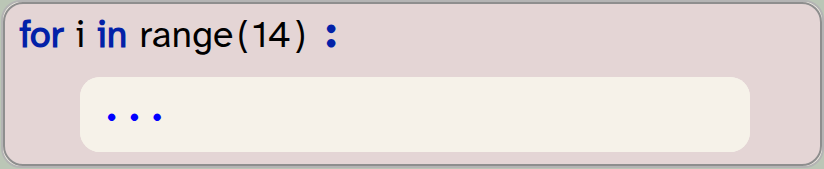
for i in range(14):
   ...
In this case, you do not immediately know what the number 14 means. Why 14?
If instead, it says
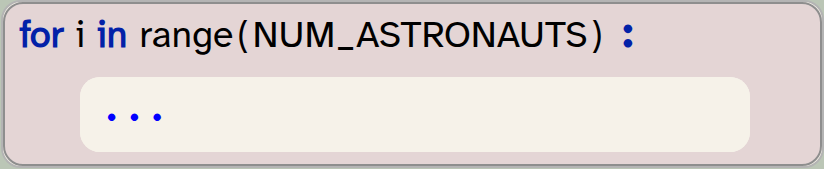
for i in range(NUM_ASTRONAUTS):
   ...
then it is much clearer. The value itself may still be 14, but you now know immediately that this loop is linked to the number of astronauts in the game. Constants can give names to your values, and make your code easier to read.
Secondly, you may have used the number of astronauts at multiple places in your program. Should you later change your mind and decide to show 20 astronauts, you now have to find all the places in the program where that number is used, and change it to 20 in each place. In larger programs, this can be challenging. If, instead, you used a constant, you can change the value one single time, and it will automatically be used wherever it is needed.
Thus, constants make your code better in two ways: They make the code more readable, and they make it easier to maintain.
Using constants in your program improves code quality: they make a program more readable and easier to maintain.
Exercise 5.16 Is there another variable in this program that could or should be a constant? Discuss.
 Good programming practice: Avoid magic numbers; use named constants
Use named constants to attach names to specific values. Avoid having arbitrary numbers in your code; instead, name them to describe what they are and use the named constant where the value is needed.
5.6. Global and local variables
The other new construct you may have noticed in the source code of the space-rescue program is the use of the term global:
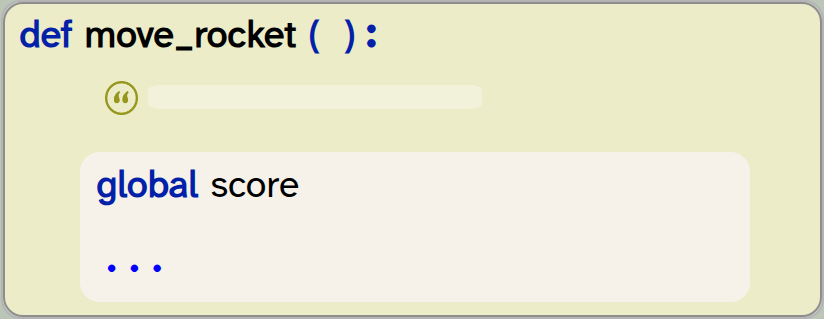
def move_rocket():
    global score
    ...
This construct has to do with the difference between global variables and local variables.
Python distinguishes global and local variables and keeps them separate. Local variables are those declared inside a function. If you introduce a variable inside a function body, it is automatically local, and it can only be used inside that function. In fact, it does not survive after the function ends: when the function exits, the local variable is deleted (and next time the function runs, an entirely new variable is created).
Global variables, on the other hand, exist for the whole time the program runs. They are the ones that are created outside of functions (in the "My code" section or directly in the "Definitions" section, outside of a function definition).
A global variable is a variable declared at the outer level of your program (outside of function or class definitions). Global variables hold their value throughout the entire run of a program.
A local variable is a variable that is declared inside a function. It is created every time the function executes, and is destroyed when the function ends.
Exercise 5.17 In the space-rescue program, find an example of a global variable. Find an example of a local variable.
To investigate the relationship of global and local variables a bit more, consider this code:
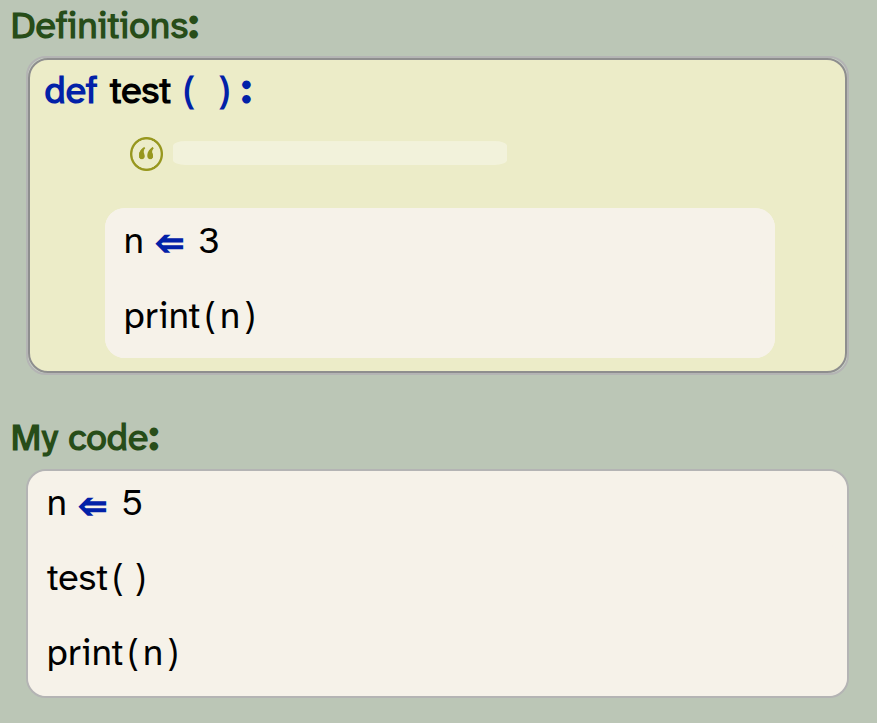
def test ( ) :
    n = 3
    print(n)

n  = 5
test()
print(n)
Exercise 5.18 For the code shown above, predict what the program will print.
Exercise 5.19 Create a new project for this experiment and type in the code shown above. Run the program and compare the output to your prediction. Were you right?
Exercise 5.20 Try to explain why the output is what it is.
The result of this experiment can be puzzling at first. The reason we see two different values printed is that Python keeps global and local variables completely separate. As you can see here, you can even have two variables with the same name! The assignment n ⇐ 5 creates a global variable, and the assignment n ⇐ 3 creates a local variable (because it is inside a function). The fact that these have the same name does not matter – they are two separate variables.
5.7. Accessing global variables in a function
Now insert the declaration global n at the beginning of your function:
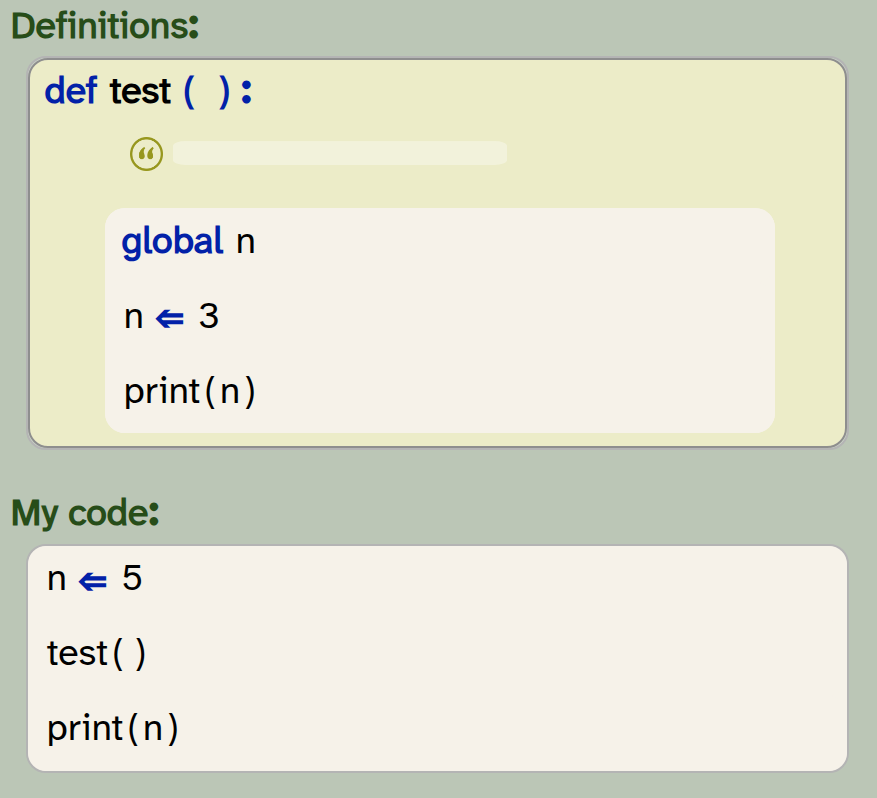
def test ( ) :
    global n
    n = 3
    print(n)

n  = 5
test()
print(n)
Exercise 5.21 Predict what will happen when you run your program after the change shown above.
Exercise 5.22 Try it out: make this change in your code and run your program. Discuss what you see.
Exercise 5.23 What happens when you change the assignment in the test function from n ⇐ 3 to n ⇐ n + 1? Predict the outcome, and then test it.
Exercise 5.24 What happens when you now remove the global n declaration again? Try it out.
When we use the global n declaration inside the function, we are saying that we want to use the global variable n, instead of creating a new, local variable.
The result of the Exercise 5.24 can be quite confusing. The reason here is the following:
-
We now have no
globaldeclaration in our function. Therefore,nis a local variable. -
Local variables are created when the function starts. Initially, they have no value (until you assign a value to them).
-
In the assignment
n ⇐ n + 1, Python first evaluates the right-hand side of the assignment:n + 1. Here, we try to read the value ofn, but this variable does not yet have a value – we have not assigned one yet. Thus, it causes an error when we try to read this variable.
The error you see here is called an UnboundLocalError (you can see this in the error message). It is useful to remember this error and its cause – you are likely to see it again.
The declaration global var_name used inside a function makes every use of the variable name var_name afterwards refer to the global variable var_name instead of referring to a local variable.
Exercise 5.25 In the space-rescue-v2 program, find a use of the global declaration. Explain why it is needed here.
Exercise 5.26 Remove the use of the global declaration from the program and run it. Explain the error you see.
Good programming practice: Keep variables local
A good rule to improve the quality of your code is to use local variables whenever you can. If a value is used only inside a function, you should use a local variable. Use global variables only when necessary. Use of global variables has the effect that your program is harder to understand, and harder to adapt. You can often avoid global variables by passing values into functions as parameters when you need the value, and returning them if you need to modify the value in the function.
5.8. Summary
In this chapter, we have seen another use of lists in Python: lists of actors. We can generalise this idea: Lists can hold elements of any type in Python. We have also seen that the graphics world automatically maintains a list of all actors in it, and that we can obtain this list (either a list of all actors, or lists of selected actors).
In the example we discussed here, we also saw two new concepts: We saw how to make use of constants, which are written in capital letters, and we looked at global versus local variables. We have seen that local variables exist only within a single function, while global variables are available throughout the program.

-
The graphics system maintains a list of actors. We can obtain a list of all actors, or of selected actors, by using the get_actors() function.
-
A variable written in capital letters is considered a constant. Values of constants should never be changed. Python does not enforce this, but it is bad practice to do so.
-
Using constants in your program improves code quality: they make a program more readable and easier to maintain.
-
A global variable is a variable declared at the outer level of your program (outside of function or class definitions). Global variables hold their value throughout the entire run of a program.
-
A local variable is a variable that is declared inside a function. It is created every time the function executes, and is destroyed when the function ends.
-
The declaration global var_name used inside a function makes every use of the variable name var_name afterwards refer to the global variable var_name instead of referring to a local variable.

Piano
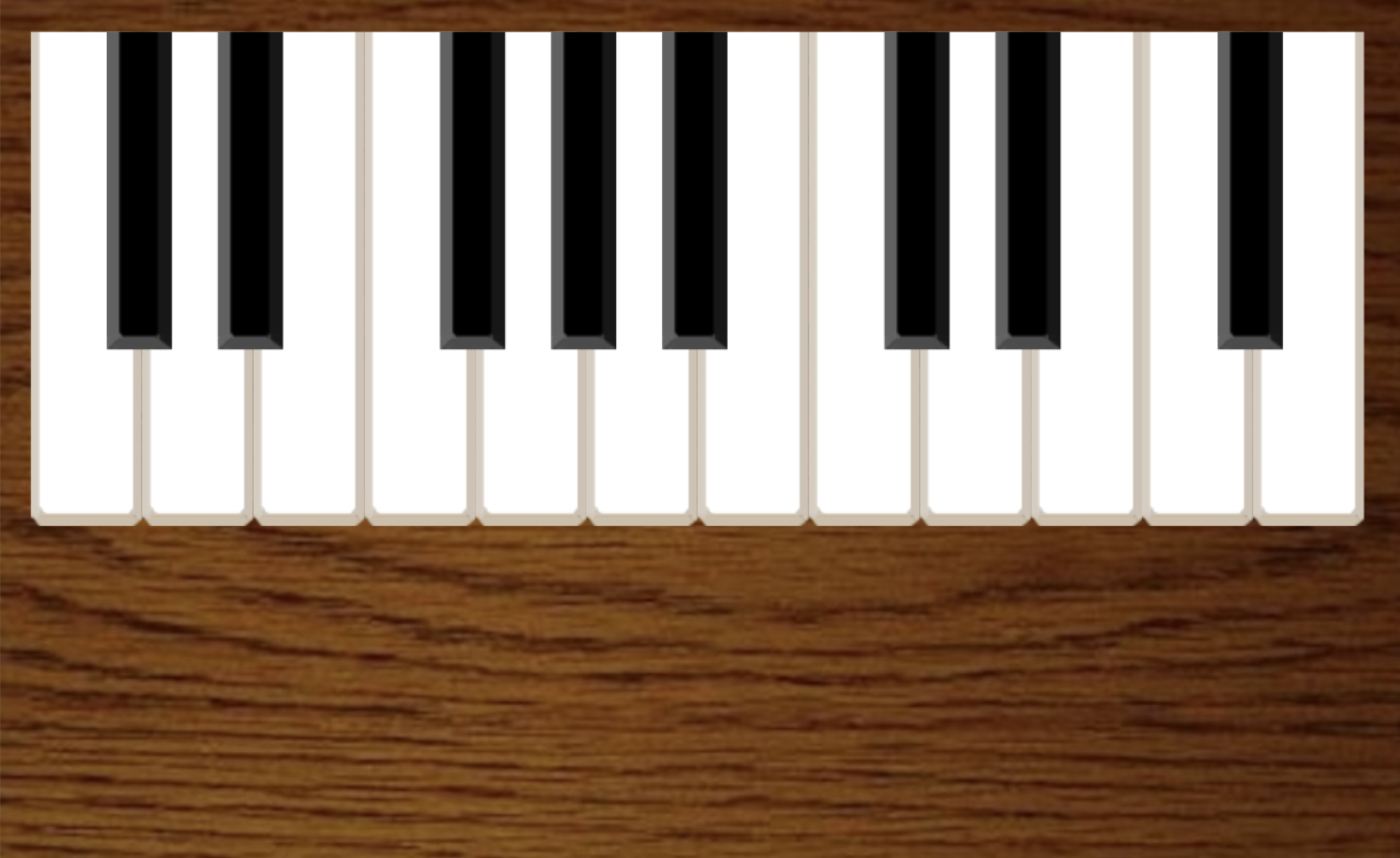
We worked a lot with lists in the last chapters, and you may have got an understanding how to use lists and what they can do. Here, we have a project called piano which shows some other ways to use lists. The project implements a simple piano (which you can play with your keyboard), and in doing so it makes use of lists of strings, actors and sounds.
You may like to study this project code to see how this is done.