Chapter 4. Processing lists
In the previous chapter, we have seen how to create a list and how to use some of the most common list functions and methods. Many of these methods (such as len(), min(), max()) were provided ready-made by the Python system. Often, however, we will want to do a task that does not have a ready-made function; we then have to write our own.
In this chapter, we look at a few ways to process the elements in a list by writing our own custom-made list functions. We start by implementing our own versions of some of the standard functions to see how they work, and then we go on to some more interesting functionality.
We continue to work with the temperature project from the previous chapter; you can use temperature-v2 if you do not have your own version.
4.1. Calculating the average
When a function we need is not available in the standard libraries, the existing functions still may help doing a large part of the work. Assume, for example, that we want to calculate the average (mean) temperature for the year. There is no ready-made average function in Python, but we can quite easily compute the result using the sum() and len() functions. (Strictly speaking, this is only half true: there is an average function available in a separate module that we could import, but let us ignore this for now and work with the sum() and len() functions.)
Exercise 4.1 Write a function to calculate and return the average temperature for the year. Call this function and print out the result.
4.2. Calculating the sum
Sometimes, however, we have tasks where the pre-made functions do not directly help us. In those cases, we typically have to process the list ourselves. This often involves a loop iterating over the list elements, and one or more variables to compute the result.
We will investigate this first by implementing two of the existing functions ourselves: sum() and max().
Let us consider the sum() function first: We can calculate the sum of a list using the following algorithm:
-
Create a variable
totaland initialise it to0 -
Loop over the list; for each element:
-
Add the list element to total
-
Try to write this function yourself.
Exercise 4.2 Implement a function called my_sum() that takes a list as a parameter and returns the sum of its elements (without using the built-in sum() function). Print out the sum of your list of temperatures using your function. Also print out the sum using the built-in sum() function. Compare the results. Are they the same?
 Precision of decimal numbers: If you look at calculated decimal numbers in Python, you will sometimes see unexpected values. For example, you might see
 4696.900000000001 where we would expect 4696.9, or we see 0.30000000000000004 when we print the result of 0.1 + 0.2 (try it out!).
This is caused by the way floating point numbers are stored in computers: Decimal values in computers all have limited precision. That means that they cannot store an arbitrary number of decimal places – they are all rounded at some point. And because they are internally stored in a binary format – different to the decimal format we write – what appears as a simple number for us, 0.3, is sometimes "rounded" to a surprising binary value internally.
The lesson to take away from this is: working with floating point numbers is always imprecise, and small rounding errors creep in in all floating point calculations. Often, however, the result is precise enough for what we need.
We can round the value before we print it out to remove extra decimal places.
4.3. Finding the maximum
A similar pattern can be used to find the maximum in a list. Here, however, we have to add an if-statement to our algorithm to solve the problem. The idea looks like this:
-
Create a variable called
maximumand initialise it to the first element of the list. -
Loop over the list; for each element:
-
If the element is larger than
maximum:-
Assign the current element to
maximum
-
-
Exercise 4.3 Implement a function called my_max() that takes a list as a parameter and returns the maximum of its elements. Print out the maximum of your list using your function. Also print out the maximum using the built-in max() function. Compare the results. Are they the same?
Exercise 4.4 Why did we initialise the maximum variable to the first list element? Why did we not just initialise it to 0? Would it work the same if we initialised it to 0?
Exercise 4.5 Are there cases where our function would fail?
4.4. Finding the biggest change
Next, we would like to answer the question of the biggest swing in temperature: On which day did we see the largest temperature difference from the previous day?
There is no ready-made function available to compute this, so we will have to write a function ourselves. This one is a bit more involved than the previous two we looked at.
Let us start with some observations:
-
To investigate the largest temperature difference, we have to compare each day to the previous day.
-
This means that we have to start at the second day; the first day has no previous day.
-
It also means that we need the day index: we can compare a day to the previous day by comparing
temp[n]totemp[n-1]. This only works when we have the index available.
In the previous exercises, we wrote loops over the elements of a list using a for loop like this:
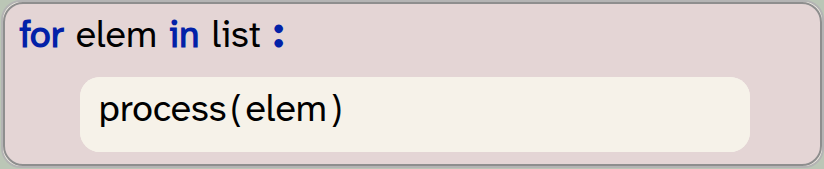
for elem in list:
    process(elem)
This is fine when we can process every element separately, in isolation, but is not sufficient when we need to compare the element to other neighbouring elements. One option to solve this problem is using a loop with an index:
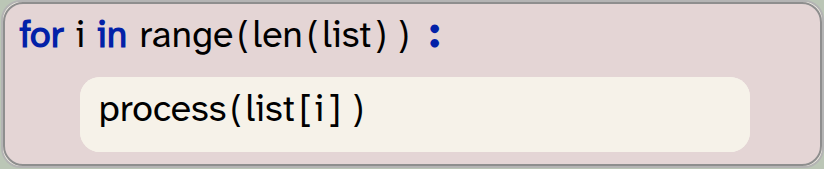
for i in range(len(list)):
    process(list[i])
Here, the loop variable does not iterate over the list elements. Instead, the loop variable is an int, and it iterates over all the valid indices of the loop. (Remember: range(n) includes all values 0 .. n-1, and list indices are 0 .. len(list)-1, so range(len(list)) gives us exactly all the valid indices.)
 Iterating over the indices of a list (rather than the elements themselves) gives us more flexibility to access several different elements in each iteration.
An advantage with this loop now is that we can also access list elements other than the current one by writing, for example, list[i-1].
If we want to use this pattern for finding the temperature differences, as discussed above, we have to modify it slightly, since we would like to start the loop with the second element. We can achieve this by using the range function with two parameters, for the lower and upper boundaries:
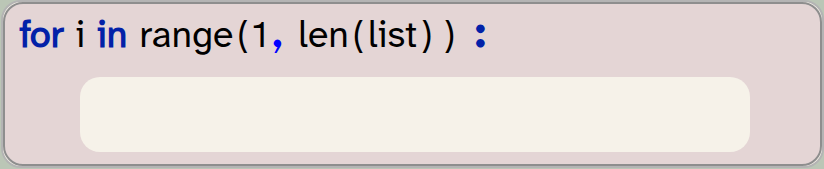
for i in range(1, len(list)):
    pass
In this variant, the first time the loop body executes, it will access list[1], which is the second element.
Next, we look at how we can tell the difference between the current and previous days. To compute the difference between two values a and b, we can subtract the values from each other and then use the abs(n) function. abs(n) is a built-in function, and it returns the absolute value of n (that is, the positive equivalent, if n was negative). It is necessary to use the absolute value, as the temperature may go up or down, so the value of a-b might be positive or negative.
The built-in abs(n) function returns the absolute value of n.
Putting these pieces together, we get a loop that looks like this:
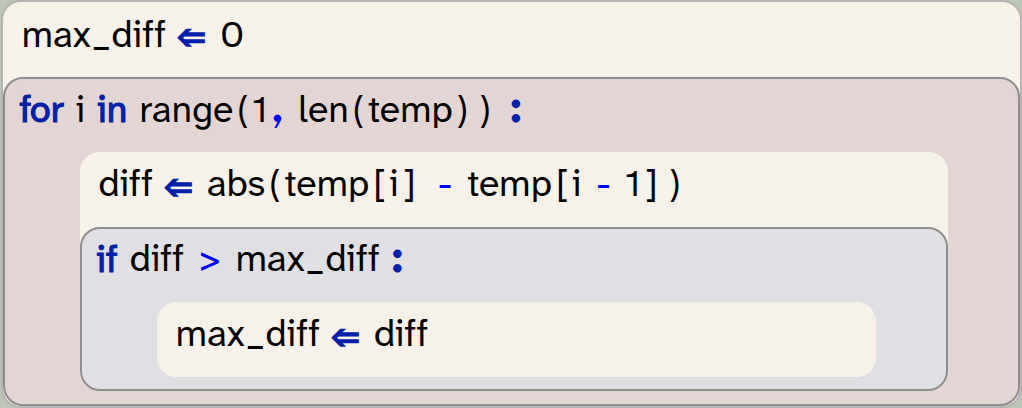
max_diff = 0
for i in range(1, len(temp)):
    diff = abs(temp[i] - temp[i-1])
    if diff > max_diff:
        max_diff = diff
Names of loop variables: We have previously said that you should always choose meaningful names for variables. Yet in the code above, we have used the name i for the loop variable. This is not an accident: Traditionally, i is often used for a loop variable of type int if it is used as an index. This is so common, that i for an index loop variable is actually a meaningful name – every practiced programmer will understand it. This also means that you should use i as the name only if the variable is a loop variable used as an index.
Exercise 4.6 Look at the code above and explain it in your own words. Write down this explanation.
Exercise 4.7 Implement the code above in your own program and print out the biggest temperature change in the year.
Exercise 4.8 If you have not already done so, make sure that the code from the previous exercise is in its own function (perhaps called biggest_change(list)).
Exercise 4.9 Change your code so that it does not find the biggest temperature change, but instead the day number on which the biggest change occurred. Print it out. Which day is it?
Exercise 4.10 Change your function again so that it finds both, the largest temperature change and the day on which it occurred. (Hint: The return statement used in a function can return more than one value: return a, b.)
An implementation of the exercises discussed in this section is in the project temperature-v3.
4.5. Enumerating lists
Another option we have available when we need the index of each list element is to use the enumerate(list) function:
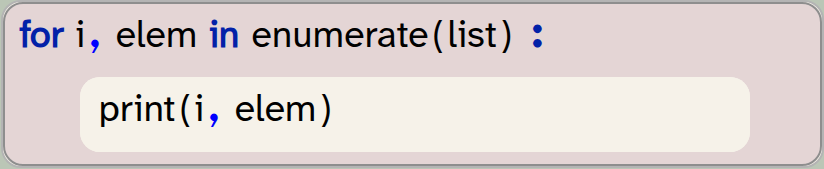
for i, elem in enumerate(list):
    print(i, elem)
Try this code with your temperature list and see what it does. This experiment should show you the following:
-
The enumerate(list) function returns two values: the index and the element value of each list item.
-
We can use a for-loop with two loop variables to receive these two values.
-
In the loop body, we can then use the value and the index of each element. (Here, we just print them out.)
The enumerate(list) function can be used for an iteration that gives us both the index and the value of each element. To do this, we use a for-loop with two loop variables.
Exercise 4.11 Try to rewrite your biggest_change function using the enumerate function in the for-loop instead of the range function. Print out and check the result. Is it the same as before?
A first attempt of using this function for our goal might look like this:
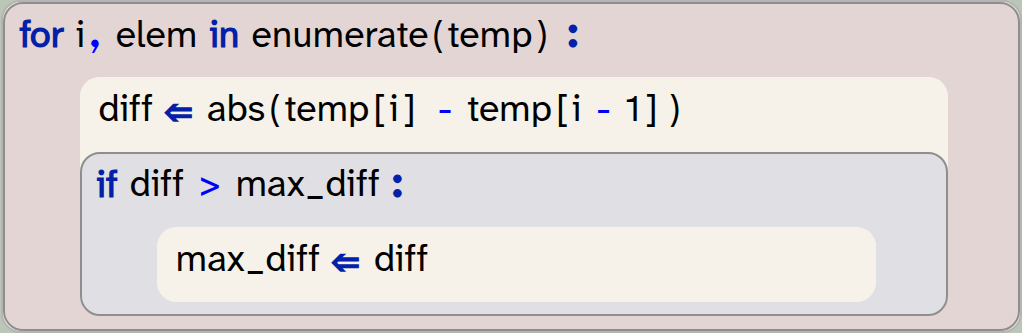
for i,elem in enumerate(temp)  :
    diff  = abs(temp[i] - temp[i - 1])
    if diff > max_diff :
        max_diff  = diff
However, if you run this code, you will notice that it gives us a different result than our code in the previous section (using the range function).
Exercise 4.12 Make a note of the biggest one-day temperature change as computed by the version in the previous section (using the range function). Then implement and test this version shown here. You will note that the result is not the same. What are the results that are reported by each version? Can you explain why they are different? Which version is correct?
The reason it goes wrong with this version is the loop boundaries. In Section 4.4 we have emphasised that we need to start the iteration with the second element (index 1), so that we can compare to the element before it, using i - 1 as the index. The enumerate function, however, invariably starts with the first element. Thus, when the loop executes for the first time, i will be zero, and the first line in the loop body computes the difference as temp[0] - temp[-1].
Now you can probably see the problem: We are trying to access an element with a negative index: temp[-1]. What does this do?
4.6. Negative indices
In many programming languages, using a negative index in a list is an error. Valid indices in many languages are from 0 to len(list)-1.
In Python, however, negative indices are allowed: If we use a negative index, the index is counted from the end of the list. Thus, index -1 accesses the last element, -2 the second-last element and so on.
Exercise 4.13 For a quick test of negative indices, print out the last and the second-last element from your temperature list.
Exercise 4.14 Can you now explain what happened in the enumerate loop above?
The answer to the question which of the two versions calculating the largest temperature change is correct is that the second version is wrong. When we used the enumerate function, we compared the first day of the year to the last day of the year – two days that did not follow each other. To compute the correct answer, we need to start the loop with the second list element, and the enumerate function does not do that.
A lesson from this discussion is this: In most cases when we need access to the index of our elements during a loop, using the enumerate function is the easiest solution. If, however, we need to control the start or end of the iteration to not include all elements, then we need to generate the index ourselves, using an int loop variable and the range function.
Using a negative index for a list counts the element index from the end of the list. Index -1 is the last element, -2 is the second-last element, and so on.
4.7. Calculations with lists
In the previous chapter, we have deferred two problems for later: the first was translating a day number to a more readable date format. We can print out the day number of a day, but we don’t really know what date this represents.
The second problem was that we had to know the day numbers of the start and end date to specify months for slicing. If, for example, we want the slice of the list representing the data for July, we have to know that the first of July is day 181, and 31st July is day 212. This is not something we could easily know or calculate.
Let’s start by looking at the second problem and see how we can automatically calculate the start and end day numbers for a given month.
We start our solution by creating a list that holds the numbers of days for each month. (This is slightly simplified, because we are ignoring leap years. But it works for our data, since 2025 was not a leap year.)

month_lengths = [31,28,31,30,31,30,31,31,30,31,30,31]What we actually need, however, is not the length of every month, but a list with the day number of the start of every month. We can create such a list by going through our list of month-lengths and adding up the day numbers. Figure 4.2 illustrates this idea.
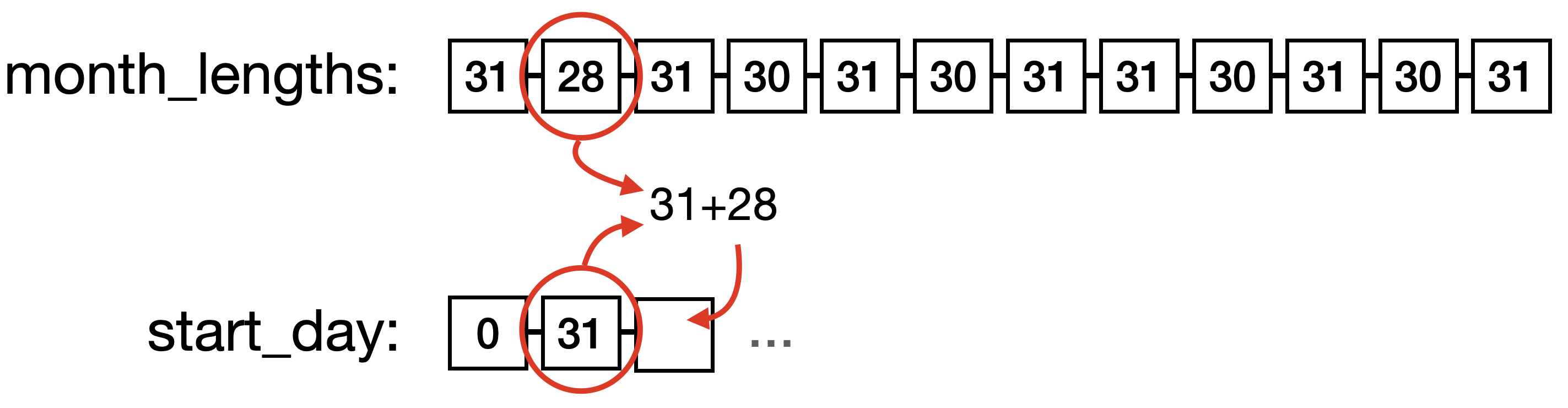
In our new list, start_day[0], for example, is that start of January, start_day[2] is the start of March, and start_day[11] is the start of December.
To create this list, we start with a list that just contains 0 as the start index for January. Then we create the rest of the list by adding the number of days of each month to the last value in our new list, as shown in Figure 4.2. The code to achieve this looks like this:
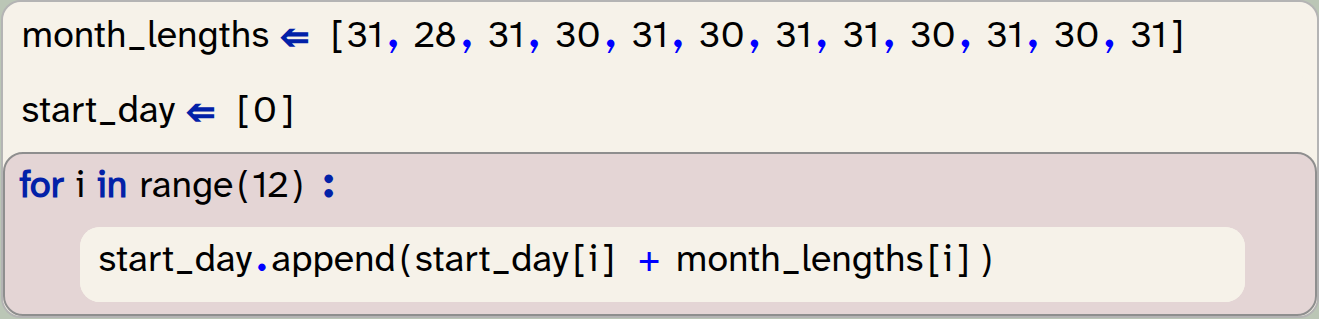
month_lengths = [31,28,31,30,31,30,31,31,30,31,30,31]
start_day = [0]
for i in range(12):
    start_day.append(start_day[i] + month_lengths[i])
You may have to think carefully about this idea to fully understand it.
Exercise 4.15 Play the algorithm above through using pen and paper. Draw the month_lengths list. Then draw the start_day list as it is at the beginning. Then go step by step through the code above and modify your drawing with every step to show the effect of that code.
Exercise 4.16 Implement the code above in your own program. At the end, print out the start_day list – does it look like you expected?
Exercise 4.17 How long is this list? Do you have an idea why we made it this length?
This list is now very useful for creating slices of data for a specific month. Every entry in this list, together with its next value, now tells us exactly the start and end of the slice for a month. Note that we have created this list with 13 values (not 12), so that December also has a following value to mark its end.
We can now write a function that gives us a slice for a given month:
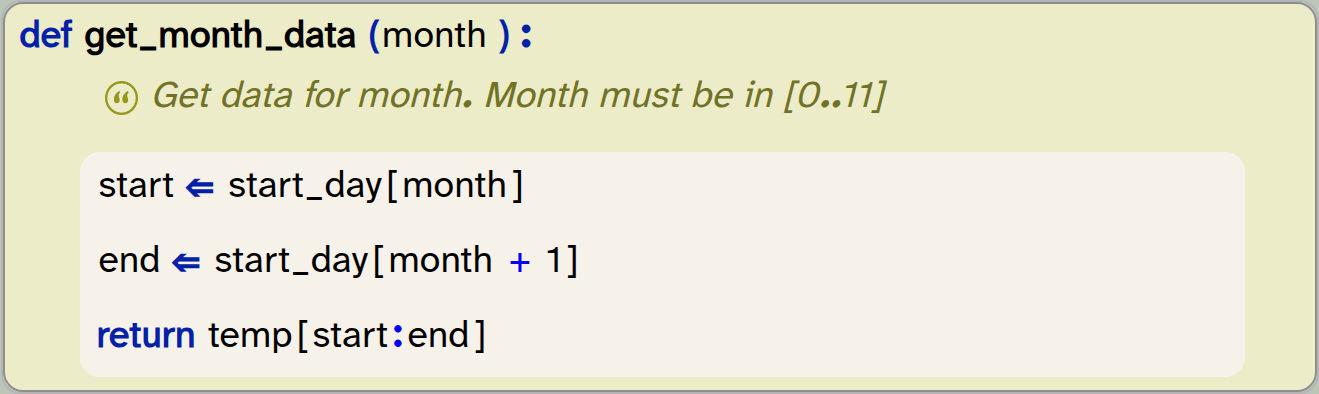
def get_month_data(month):
   '''Get data for month. Month must be in [0..11]'''
   start = start_day[month]
   end = start_day[month+1]
   return temp[start:end]
This function can be called with a number for a month, and it will return the sliced list with the temperature values for that month. For example, get_month_data(0) will return the data for January.
Exercise 4.18 Implement the function shown here in your own program. Test it by printing out the values for December. The temperature for the 1st of December should be 10.7 degrees.
Exercise 4.19 Find and print the temperature of the warmest day in December.
Exercise 4.20 One minor annoyance is that the month numbers are out by 1 compared to what we commonly use. For example, we have to write 2 for the March data, but we normally refer to March as 3. Modify your get_month_data function so that we can use normal month numbers (i.e. 1 for January, 12 for December, and so on).
Exercise 4.21 You can now call your get_month_data function with values 1 to 12 as parameters. What happens if you use an invalid parameter, for example 14, or -1? Try it out.
Exercise 4.22 Modify your function so that it prints out an error message if it is called with an invalid parameter and works as before if the parameter is valid.
An implementation of the exercises in this section is in the project temperature-v4.
There are many possible extensions to this project. We could, for example, modify our function to accept names of months, rather than a month number, and then use another list of month names to find the index of a given month by searching for the name. We can also use the same start_day list that we have used here to write a function that maps a day number to a date as a day/month pair. These are interesting exercises, and we leave it to the curious reader to work on them.
Instead of discussing more possibilities of processing our list of numbers, we will – in the next chapter – look at how we can use lists for other types of data. We will do so by looking at some graphical programs again.
4.8. Summary
In this chapter we had a closer look at working with the data in lists, especially for cases where no ready-made standard functions are available. In this case, we often write loops that iterate over the list and process every element. Writing such loops is an important skill for every programmer.

-
Iterating over the indices of a list (rather than the elements themselves) gives us more flexibility to access several different elements in each iteration.
-
The built-in abs(n) function returns the absolute value of
n. -
The enumerate(list) function can be used for an iteration that gives us both the index and the value of each element. To do this, we use a for-loop with two loop variables.
-
Using a negative index for a list counts the element index from the end of the list. Index
-1is the last element,-2is the second-last element, and so on.

Graphical plotting
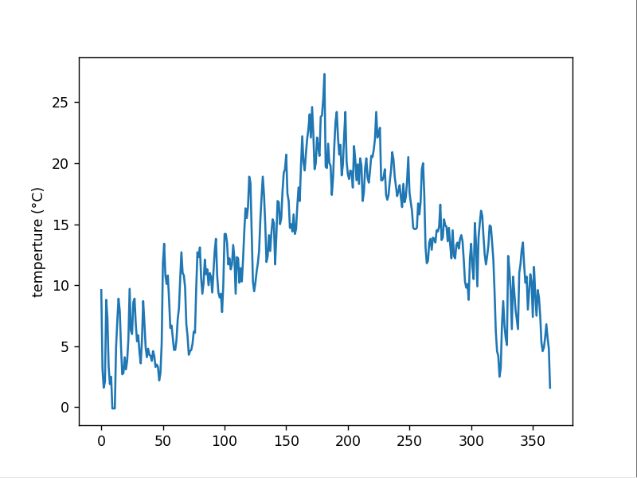
One thing we have not yet done with our temperature data (but which is quite an obvious idea) is to plot the data as a graph.
Here is a project that does just that: temperature-plot.
This project uses the same temperature data we have used in this chapter, and then turns it into a graph. Plotting the data graphically is easier than you might expect, as there are good libraries available that do all the hard work for you. In this case, we use the library matplotlib.pyplot, which does the work for us.
If you want to do more with this, have a look at the pyplot documentation here (or search the web for "Pyplot tutorial" if you are reading this on paper). You will see that you can generate sophisticated graphs quite easily.