Chapter 6. Manipulating sounds
Sounds, too, are lists. In a computer, all sounds are stored as a list of samples – essentially a long list of numbers which represent the amplitude of the sound at a given time.
Samples can be read from a sound input, such as a microphone, and stored as a list. When these samples are read and stored quickly enough, we get a sound recording, and we can play it back later. Thus, working with sound again just requires the computer to work with numbers, to be fast and to be able to store large amounts of data.
Start by opening a project with a sound in it. We have provided such a project in the book projects; it is called sounds.
Exercise 6.1 Open the sounds project. Add a statement to play the sound in it.
6.1. Sounds as lists of samples
In our project, we have a sound object. We can get the list of samples that makes up this sound by using the sound’s get_samples method.
Exercise 6.2 Look up the get_samples method in the library documentation. It is a method in the Sound class. What is the range of possible values?
Exercise 6.3 Write some code to get the samples from the sound in the project. Print out the length of the sample list. How many samples does it contain?
Exercise 6.4 Print out the list of samples. What is the type of its elements?
Exercise 6.5 The sample rate is the number of samples that is recorded per second. Calculate and print the sample rate for our sound. You can do this by dividing the number of samples by the length of the sound in seconds. (You can get the length by calling the sound’s get_duration() method.)
Exercise 6.6 The Sound class also has a get_sample_rate() method built in. Call this method and compare it to the sample rate you calculated in the exercise above. Do they match?
 A sound is stored as a list of samples. We can get the list of samples from a sound object using the
 get_samples() method.
A sample rate is the number of samples per second that is recorded for a sound. The higher the sample rate, the better the quality of the recording (and the larger the file when we save it).
6.2. Recording your own sounds
Instead of using the "Hello" sound currently stored in the project, record your own sound to use for this chapter. For now, use a word or a short phrase.
You can record your sound directly in Strype. Delete the sound literal that is currently in your program, and leave the cursor in the value slot on the right-hand side of the assignment:

hello = blankYou can then click the "Record sound" option in the top right of the Strype window (or use Space s on your keyboard) to bring up the sound recorder and record your sound. Once you have done this, play the sound back (and re-record it if necessary, until you are happy with it).
When you record a sound from a microphone, it usually has some silence (or unwanted noise) at the beginning and end. Use the trimming function (the red handles at the sides of the sound graph, Figure 6.4) to cut off the unwanted parts; only the section between the red bars will be used. If we do not do this, the sound will appear to play with a slight delay, because it will play the initial silence as well.
Once you press OK, the sound will be inserted into your code.
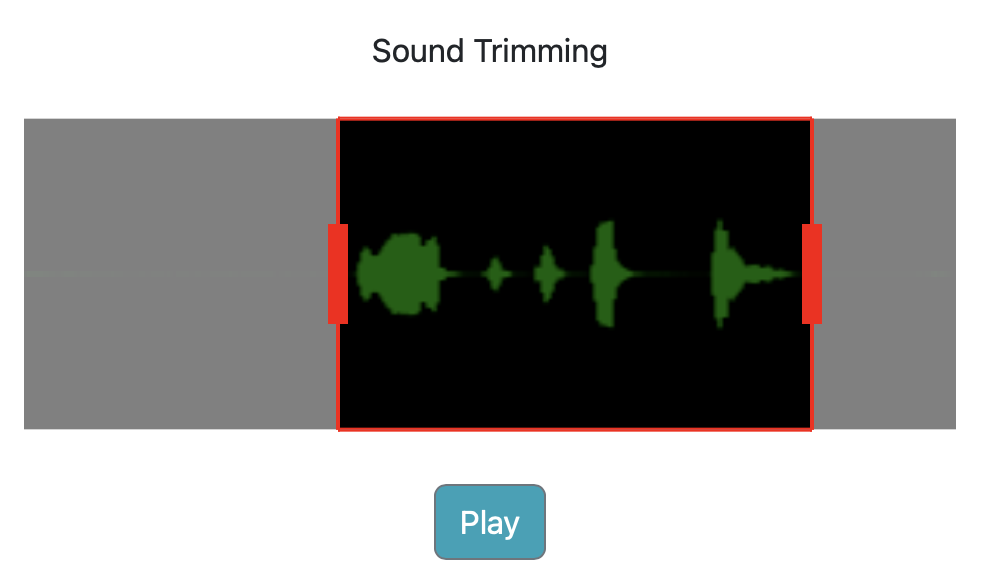
Exercise 6.7 Record your own sound, trim it, and insert it into your code. Play it to make sure you are happy with it.
Exercise 6.8 If you left your variable name as hello, then this name is now probably inaccurate. Rename your variable to a sensible name.
Exercise 6.9 What is your sound’s length? What is its sample rate? Print out this information, with appropriate text to explainb what is printed.
6.3. Playing backwards
The first experiment we can do to manipulate our sound is to play it backwards. We can do this by reversing our samples list. Reversing a list is straight forward – the List class has a reverse() method that reverses the order of the values in a list:

samples.reverse ()Exercise 6.10 In your program, get the samples list from your sound. Play the sound. Then reverse this list, and play the sound again. Is the sound now playing backwards?
Depending on how exactly you wrote the code for the exercise above, this may or may not have worked. Let us look at the required code in more detail. A first attempt to reverse our sound might look like this:
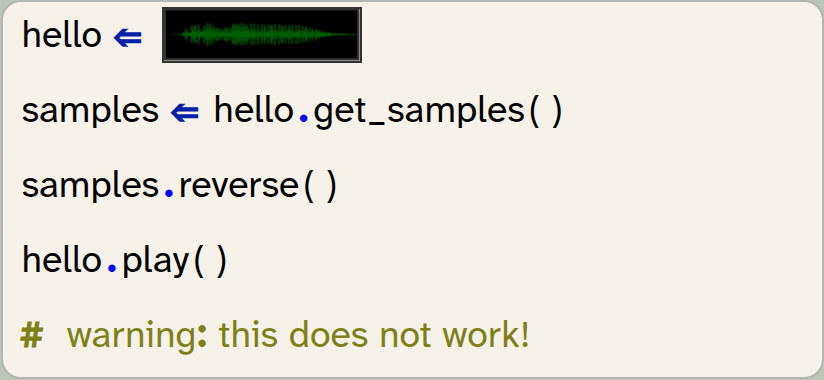
hello = image_literal
samples = hello.get_samples()
samples.reverse()
hello.play()
# warning: this does not work!
As the comment in the code snippet says: this does not work. The reason for this is that the get_samples() method gives us a copy of the sound’s samples. So by reversing the list, we are reversing the copy, but we are not changing the original sound.
We can fix this problem by creating a new sound from the reversed sample list and then playing the new sound:
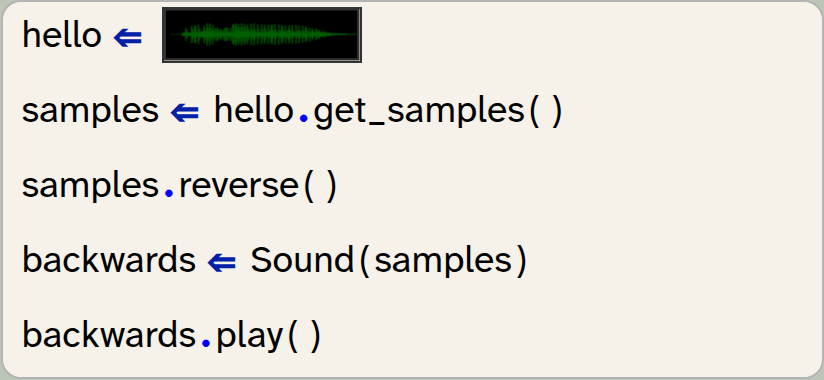
hello = image_literal
samples = hello.get_samples()
samples.reverse()
backwards = Sound(samples)
backwards.play()
We see here that we can create a sound, using the Sound class’s constructor (writing the class name Sound with a parameter list), and providing the list of samples as the parameter.
A sound object can be created from a list of samples by using the statement Sound(sample_list).
Exercise 6.11 Implement the code shown above: reverse the sound and play it backwards.
6.4. Repeating a sound effect
We can now also make other modifications to our sound using the same pattern: modify the sample list, then create a new sound from the new samples.
Let us start by duplicating the sound. We can duplicate a list by using the multiplication operator: *. For example:

my_list = [1,2,3]
my_list = my_list * 2
will duplicate the list so that it contains its elements twice. The list then is:
[1,2,3,1,2,3]
We can also use the plus operator to append one list to the end of another:

my_list = [1,2,3]
my_list = my_list + [6,7,8]
Let us experiment with this. Write some test code for the exercises below.
Exercise 6.12 Create a short list of numbers. Use the * 2 operation to duplicate the list and print it out.
Exercise 6.13 Try the same with multipliers other than 2.
Exercise 6.14 Use the + operator to add two lists together. Print out the result.
Exercise 6.15 Let’s get back to our sound sample list. Duplicate the sample list and create a new sound with the new list. Play the sound. What happens, compared to the original sound?
List addition: We can join two lists together to form a single list by using the + operator: list1 + list2.
List multiplication: List elements can be repeated multiple times to form a new list by using the * operator: list1 * 3. For example, [0, 1, 2] * 3 will produce [0, 1, 2, 0, 1, 2, 0, 1, 2].
6.5. Stutter effect
An effect that is often used as part of music is to play the start of a word repeatedly before playing the whole word. For example, if your original sound is the word "Hello":
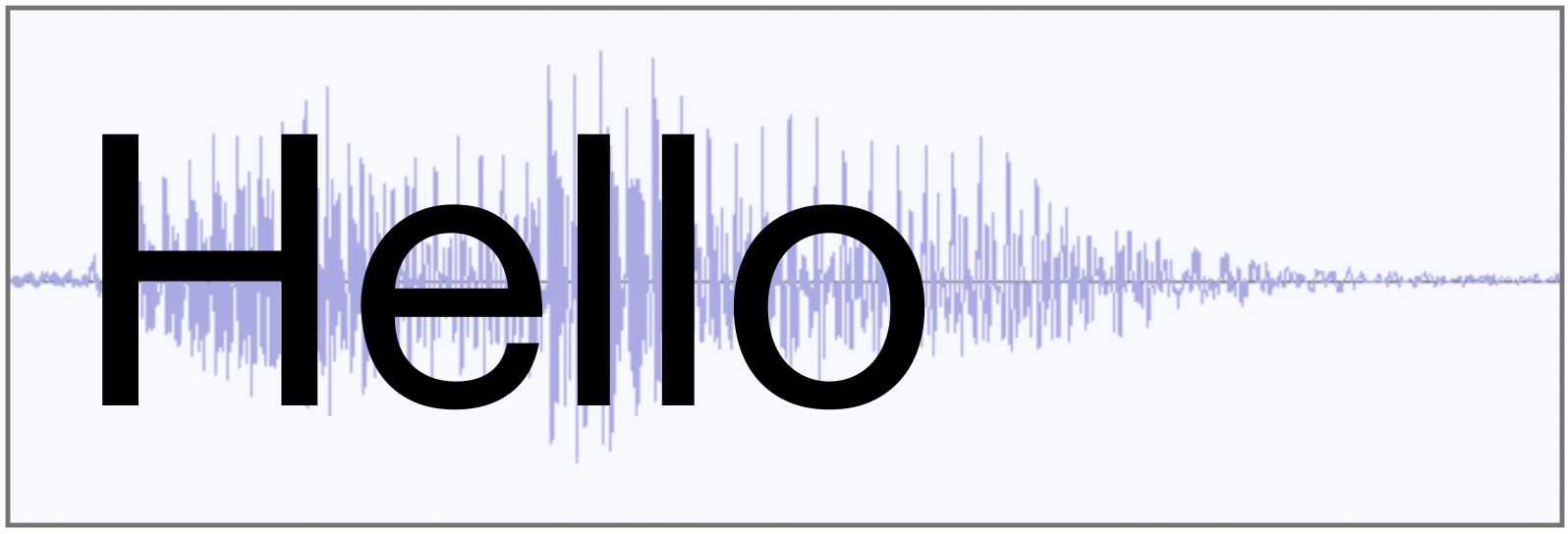
then the stutter effect turns it into this:
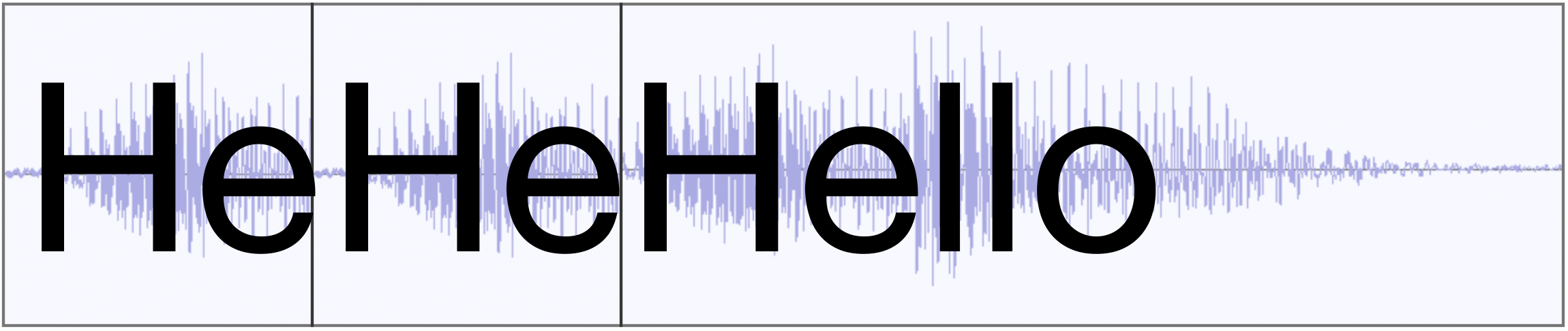
As you can see, we will have to take a copy of the first part of our sound, multiply it to play it several times, and then append the original sound.
Remember that we can use slicing to create a copy of a part of a list. For example samples[:9000] will create a list holding the first 9000 elements of the samples list.
Exercise 6.16 Implement the stutter effect in your own project. Use slicing to create the prefix sound, multiplication to repeat the prefix, and addition to append the whole sound. Test it and make sure that it works.
Exercise 6.17 Try the effect with different numbers of repetitions for the prefix.
Exercise 6.18 Make a function for producing and playing the stutter effect. The function should have two parameters: the original sound object, and a parameter called count which specifies how often the prefix sound should be repeated. For example, play_stutter(hello, 4) would play the hello sound with 4 repetitions of its partial word first. In your 'My code' section, just call this function.
Exercise 6.19 Add another parameter to your function to specify the length of the prefix part of the effect (the number of samples for the prefix). Test it.
Exercise 6.20 If you still have the code for the backwards playing in the 'My code' section of your project, it is time to clean up now: Make a separate function for backward playing as well and move your code into it.
A version of this project with an implementation of these effects is available in the Chapter 6 folder as sounds-v2.
6.6. Pitch change: double speed
Next, we will create a "cartoon voice" sound effect. This effect plays the sound sample at double speed. This has two consequences: the sound will be shorter, and the pitch will be higher. (The pitch is how high or low a voice sounds.)
Looking at our sound sample list, the idea is very simple: we can simply delete every second sample in our list. If we then play the remaining samples at the same frequency, the sound is half the length, and we can observe how this changes the pitch.
Thus, for our program, the obvious question becomes: How do we best create a list that includes only every second element from the original samples?
It turns out, slicing comes to the rescue again.
The slicing operator has a third optional parameter which we have not used yet. A full slice definition with this parameter looks like this:
list[start:end:step]
As we have seen previously, the first two parameters specify the beginning and end of the slice we wish to create. The third parameter is a step size: A step size of 2, for example, will select every second element, a step size of 3 selects every third element, and so on.
Consider, for example, the following code:

my_list = [1,2,3,4,5,6,7,8,9,10,11,12]
print(my_list[2,9,2])
This code snippet will select elements from index 2 to index 9, with step size 2. Thus, it will print
[3, 5, 7, 9]
To fully understand this, we have to recall some details about lists and slices:
-
The first list index is 0, so by using 2 as the start of the slice, we are starting with the third element (not the second).
-
The end index of a slice (we have used 9) is not included in the slice.
-
The step size here is 2, so we get every second element.
Exercise 6.21 Assume a list my_list holds the numbers [4, 5, 6, 7, 8, 9, 10, 11, 12, 13, 14]. What is the list resulting from the expression my_list[2,9,2]? What is my_list[2,9,3]?
Exercise 6.22 Write a short test program to check your answer.
With just one more bit of information, we are ready to solve our problem: We know that we are permitted to leave out the start or end value of a slice. If we leave out the start, the slice starts at the beginning of the list; if we leave out the end value, the slice extends to the end.
The new bit of information is this: When we use a step value in a slice, we are permitted to leave out both the start and the end value. We then select elements at this step interval from the entire list. In other words

my_list = [1,2,3,4,5,6,7,8]
every_second = my_list[::2]
has the effect that every_second is a new list which holds every second element from our original list, starting with the first: [1, 3, 5, 7].
Since our original goal in this section was exactly this – creating a list with every second sample – this is now very straightforward.
Exercise 6.23 Implement a pitch_up function in your sounds project. Test it.
Slices from lists can include a step value. The syntax is list[start : end : step]. When we use a step value, the slice is created by copying elements from start to end, using the step size to advance. All three slice values are optional. If we want to use a step size across the entire list, we can write list[::step].
6.7. Pitch change: half speed
The next obvious thing to do is the opposite: Playing the sounds more slowly to lower the pitch. Once we have understood the pitch-up idea, it is quite obvious how we can do this: We just duplicate every sample in our list so that it appears twice in succession. In effect, the list [3, 7, 4] would become [3, 3, 7, 7, 4, 4]. If we do this to the samples list, the list is twice as long, the sound plays more slowly, and the pitch lowers.
Unfortunately, in this case, there is no ready-made operation in Python that achieves this in a single statement. As a result, we will have to write a loop that iterates through our original samples list and creates the new list we need.
The concept for this is quite straightforward: We iterate through the list of samples, and for every sample, add it twice to a new list:
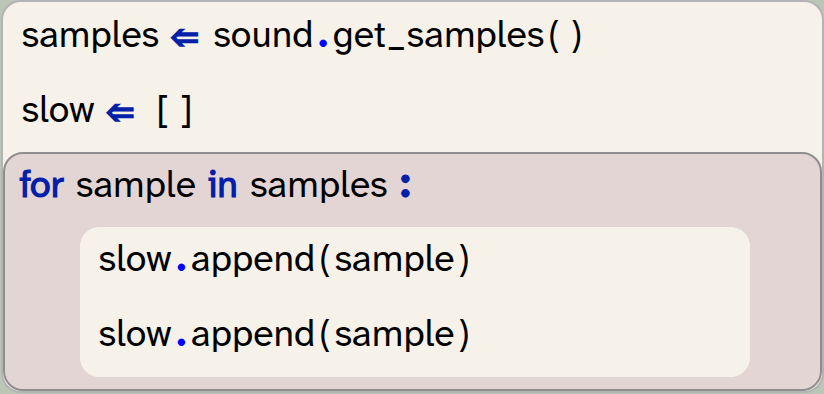
samples = sound.get_samples()
slow = []
for sample in samples:
   slow.append(sample)
   slow.append(sample)
We are starting here with an empty list. The append method adds a single element to the end of the list, and we can see that we are doing it twice to duplicate every element.
We could add both elements in a single statement if we make a short 2-element list from our two samples and then attach this list, using the extend method:
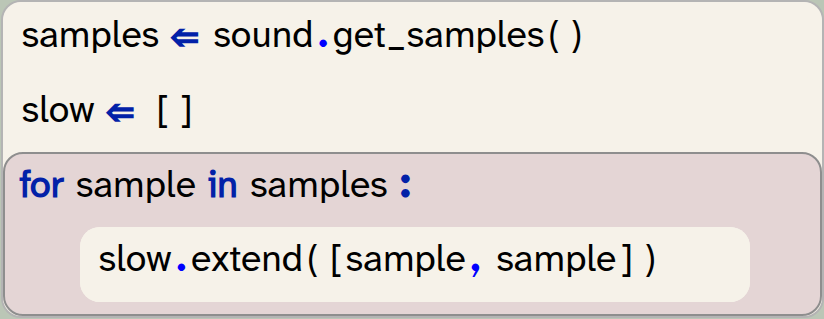
samples = sound.get_samples()
slow = []
for sample in samples:
   slow.extend([sample, sample])
We have to be careful here: If we tried to add the [sample, sample] list using the append method, we would not get an error, but it would not do what we intend to do. It would instead add the 2-element list as a single element into our new list, which is not what we need. To add each element separately, we must use the extend method.
Exercise 6.24 The difference between append and extend can be quite subtle. Research and explain the difference between slow.extend([sample, sample]) and slow.append([sample, sample]). Draw a diagram to aid your explanation.
Exercise 6.25 Implement a function to play the sound at half speed.
Exercise 6.26 If you like to try a slightly more advanced exercise, you can improve the quality of the double-length sound: Do not just duplicate every sample, but make the newly inserted samples the average of its two neighbours. The improvement in quality is subtle (and hard to hear), but this is a better way to play at half speed.
We can append a single element to a list using the list.append(elem) method. We can append every element from another list by using the list.extend(list2) method.
There are various other interesting sound effects we can create, now that we have seen how changing the samples list can create a new sound. We will suggest a few at the end of this chapter. Before we do this, however, it would be useful to create a simple interface for the user to more easily activate these effects.
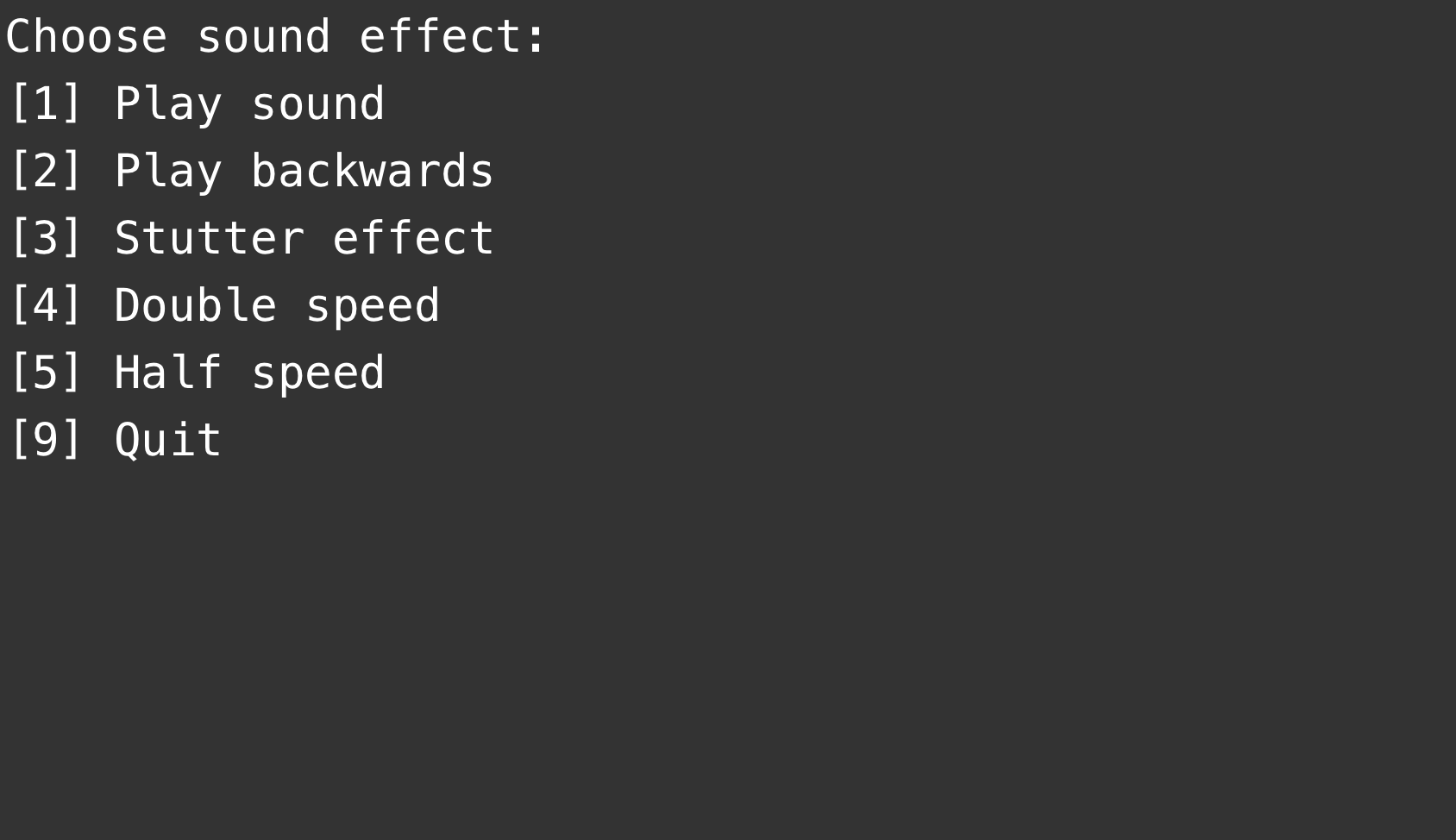
6.8. A simple text-based menu
In our current implementation, playing the sound effects was hard-coded in our program. Perhaps you wrote your code to play a single effect, disabling the calls that played the previous effects. Or perhaps you tried to play all effects one after the other – in this case, you will have discovered that the program does not actually wait for the sound to finish before continuing, and the sounds likely played overlapping. That is not a great effect.
It would be more useful to let the user choose an effect, in any order they like, from a list of available effects.
Implement such a choice now. Your task is to show a menu on the screen that looks something like the one shown in Figure 6.5.
For the main structure, use a while loop with a boolean variable exit that controls how long the loop continues. Then, in the loop, you can react to key presses, playing sound effects when needed, or setting this variable to True to exit:
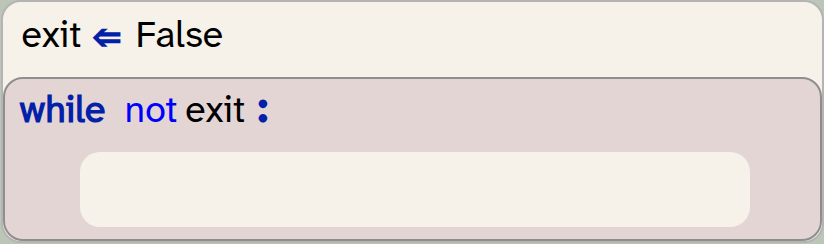
exit = False
while not exit:
    pass
Exercise 6.27 Write a function to display the menu on screen. Make sure to choose an appropriate name for the function, and to write a good function comment. Call this function from your main code section.
Exercise 6.28 In your 'My code' section, write a loop that reacts to key presses (using the get_key() function from the strype.graphics library). If a specific key is pressed, play the appropriate effect. Do this for all the effects you have implemented.
A version of the program with these exercises implemented is available in sounds-v3.
There are, however, many more experiments that we can do with our sounds. Some things you can try are suggested in the following exercises, but you are also encouraged to think about your own effects and trying them out.
Exercise 6.29 Implement a change in volume. You can decrease the volume by decreasing the values of each sample, for example dividing each sample value by 2 or by 4. You can increase the volume by multiplying the sample values. (However, you should be careful not to increase any value above 1.0, since sample values must be in the range -1 to 1.)
Exercise 6.30 Implement an echo effect. You can do this by chopping off the last half of the sound and attaching it to the end of your original sound multiple times. But each time it is repeated, it should have a lower volume than before.
Exercise 6.31 Give your echo effect function a parameter that specifies how often it should echo. And make sure the reduction in volume is such that the last echo is just about audible.
Exercise 6.32 Give your user a choice of multiple different sounds to apply the effects to.
Exercise 6.33 Experiment with producing sounds from scratch by creating lists of numbers and playing them as sound samples.
Exercise 6.34 Use graphics to make an interface for this program. Use several actors showing icons for effects, and play the effect when the user clicks the icon.
Exercise 6.35 If you feel very adventurous (this is an advanced exercise): Create a visual waveform representation of your sound in your graphics interface, similar to the one used in Strype’s own built-in sound editing dialogue.
6.9. Summary
In this chapter, we have seen yet another use of a list in Python: a list to hold the samples of a sound. Samples are numerical values, and by manipulating the list of samples, we can change a sound.
Along the way, we have encountered several useful operations on lists, such as joining and repeating lists, and slicing with step values.

-
A sound is stored as a list of samples. We can get the list of samples from a sound object using the
get_samples()method. -
A sample rate is the number of samples per second that is recorded for a sound. The higher the sample rate, the better the quality of the recording (and the larger the file when we save it).
-
A sound object can be created from a list of samples by using the statement
Sound(sample_list). -
List addition: We can join two lists together to form a single list by using the
+operator:list1 + list2. -
List multiplication: List elements can be repeated multiple times to form a new list by using the
*operator:list1 * 3. For example,[0, 1, 2] * 3will produce[0, 1, 2, 0, 1, 2, 0, 1, 2]. -
Slices from lists can include a step value. The syntax is
list[start : end : step]. When we use a step value, the slice is created by copying elements from start to end, using the step size to advance. All three slice values are optional. If we want to use a step size across the entire list, we can writelist[::step]. -
We can append a single element to a list using the
list.append(elem)method. We can append every element from another list by using thelist.extend(list2)method.

Morse code
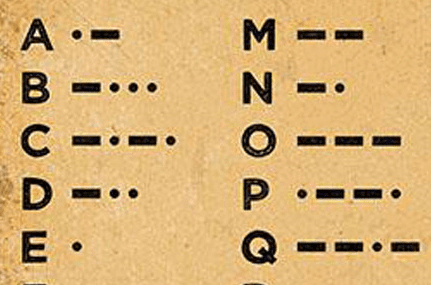
In the project suggestion at the end of Chapter 1, we have seen a cypher: the Caesar cypher. That project could encode plain text into cypher text (and then back again).
Now that we know about lists, sounds and samples, we can look at a more elaborate encoding: Morse code. It is more interesting because it does not encode text as (encrypted) text, but it encodes text as sound. (If you are not familar with Morse code, do a web search to find out more.)
The morse-code-start project implements half of this task: It includes code to turn a text string into Morse code and play it. It cannot, however, decode Morse code – turn the sound back into text.
Try to complete this project by implementing this decoding. You could, for example, let a friend play the Morse code sound to you, record it, and then try to decode the recording.
Predator/prey simulation
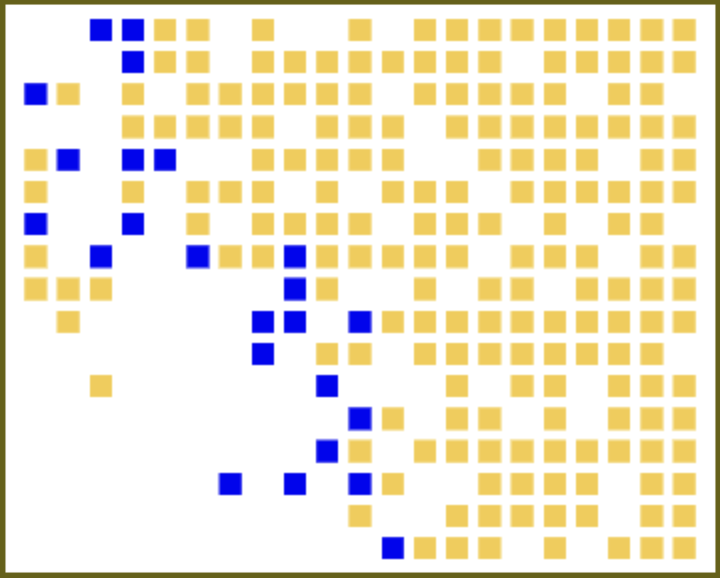
Another possibility of a project to experiment with at this stage is a predator/prey simulation.
A predator/prey simulation is a common, simple type of simulation that models the behaviour of two species, one of which hunts the other. In our case – in the foxes-and-rabbits project – we have a simulation of foxes and rabbits. Each of them is shown on screen as a coloured square in a grid, and running the simulation shows the evolution of this ecosystem.
The behaviour of our animals is quite simple: Rabbits just run around, have offspring, and eventually die of old age. Foxes are similar, but they also eat rabbits: if they see a rabbit near them, they will eat it, and if they do not eat for some time, they can starve.
For your study of lists in Python, have a look at how this project uses a list of lists to implement a two-dimensional grid.
Using this simulation, you can now examine several questions: Does the size of the ecosystem matter? (That is: does a species go extinct more easily in a smaller habitat?) Do foxes survive better if they have more offspring? If rabbits have fewer babies, will they die out? What happens when we introduce another species, one that hunts foxes?
There are endless possibilities to experiment with this project – study it and add your own ideas.