Chapter 4. Language models: Generating text
In the first two chapters of this book (and also in Volume 2 of this book series), we used computing power to analyse text. In Volume 2, we calculated some statistics, such as the number of words and reading complexity. In this book, in chapters 1 and 2, we looked at the content of the text. In this chapter, we will go a step further: we will generate text – using the computer to actually produce some new writing.
Text generation is used in various different programs. One example you may be familiar with is "predictive text" on your mobile phone. When you type "hope you have a good" in a chat app, then it often suggests words such as "day" as the next word, saving you to type it in yourself.
Another, more interesting example is found in large language models (LLMs). These models are used as the basis of AI chat systems, and they are very good at producing English language. You can, for example, ask them to write a short story, and they will do so amazingly well.
Over the next two chapters, we will write a system that can generate text. We will not nearly reach the abilities of modern LLMs, but we will implement a simple technique that captures the core idea of LLMs: predicting the next word from the words that came before it. This algorithm is able to produce words that look deceptively like meaningful English sentences, and this will give us a basic understanding of the internal workings of text prediction systems such as LLMs.
4.1. Bigrams
So how can we predict what the next word in a sentence may be? The obvious idea is to look at the preceding words, and then try to figure out what next word might fit to continue a sentence.
At its most basic, we can look at only the one word immediately before the next one. This will not be terribly good at producing sensible text, but it’s a start. So let us try to do that first.
How can we know what word might work to follow another word? Again, the basic idea here is simple: We look at a good amount of existing text, and look what words follow other words there.
Let us investigate an example by looking at an English sentence:
I read the news today, oh, boy.
In this sentence, we can see that the word "I" can be followed by the word "read", the word "read" can be followed by the word "the", and so on.
We can now write down all the pairs of words that we can see may follow each other:
(I, read)
(read, the)
(the, news)
(news, today)
(today, oh)
(oh, boy)
These pairs of consecutive words from a text are called bigrams. The list of pairs above are all the bigrams from our sentence.
 A bigram is a pair of two adjacent elements from a list, such as two consecutive words in a text.
Now, doing this with just a short sentence is not very useful, but doing the same with a very large body of text – say, a whole library – gives us very interesting information. It will tell us all the words that may follow a given other word, and it will also hold information about the likelihood of one word appearing after another. Pairs of words that appear frequently together will appear more often in our list of bigrams.
To experiment with this, let us write a program that can produce a list of bigrams from a text.
Exercise 4.1 Open the starter project text-generation-v1 from the Chapter 4 folder of the book projects. You will see that it contains just one helper method to read in a text file (read_file), and a sample text. In this project, create a new function called make_bigrams that takes one parameter (the text to use for the bigrams).
4.2. The zip function
Python has a standard function called zip, which can combine elements from two lists into a list of pairs. It will pair the first elements from each list, and the second elements, and the third elements, and so on. Let us look at this with an example.
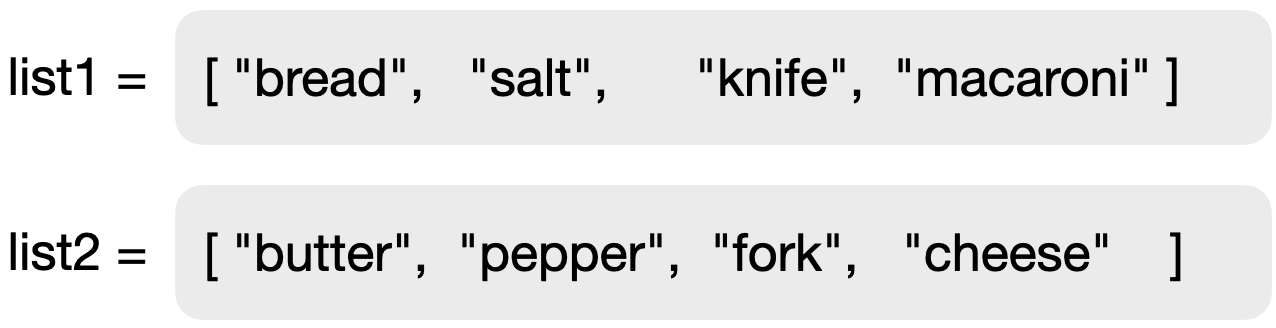
Figure 4.6 shows two lists of strings. We can take these two lists and merge them with the zip function:

pairs = zip(list1, list2)The zip function will pair up the elements of the two lists as shown in Figure 4.7. A pair is simply another name for a tuple of length 2, so what the zip function actually creates is a sequence of tuples with two elements each.
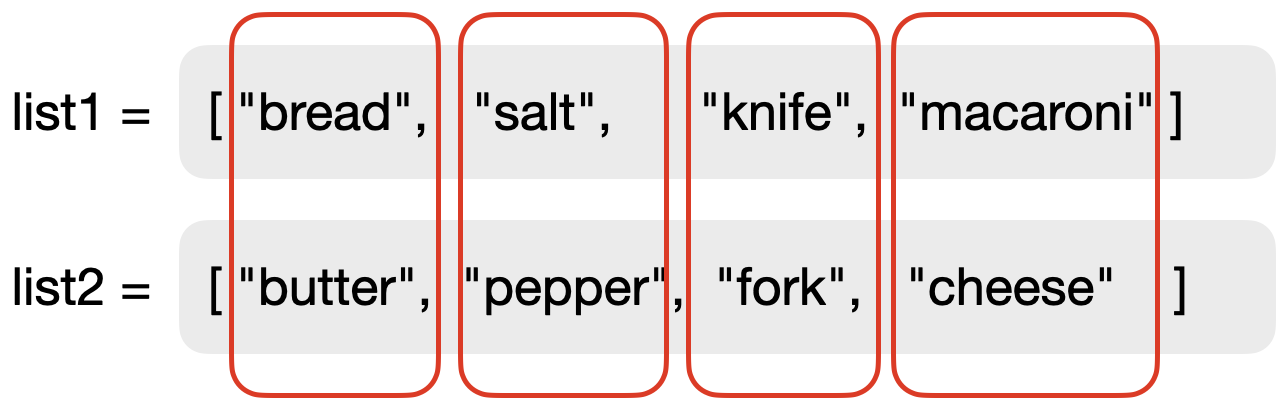
zip functionThe zip function does not return a collection itself, but a special object called an iterator. This object represents a sequence of elements that can then be turned into a collection of our choice. We can turn it into a list by writing:

result = list(pairs)We could also have chosen to turn it into another type of collection. The resulting list in this case is shown in Figure 4.8.

The zip function merges two lists into a single list of tuples, pairing the elements of each list, item by item.
Exercise 4.2 Write some test code that creates two lists and then merges them into one list of pairs, as discussed above. Print out your resulting list.
Exercise 4.3 What happens when the two original lists are of different length? Try this out and describe your observation.
So the question now is: How can we use the zip function to create the bigrams from our text?
The solution lies in the idea to take the list of words in the text, and then to match this with a list that is shifted by one word. We create this shift by just leaving out the first word in the second copy of the list. (Remember you can create a copy of a list without the first element by using the slice list[1:].) This is illustrated in Figure 4.9.
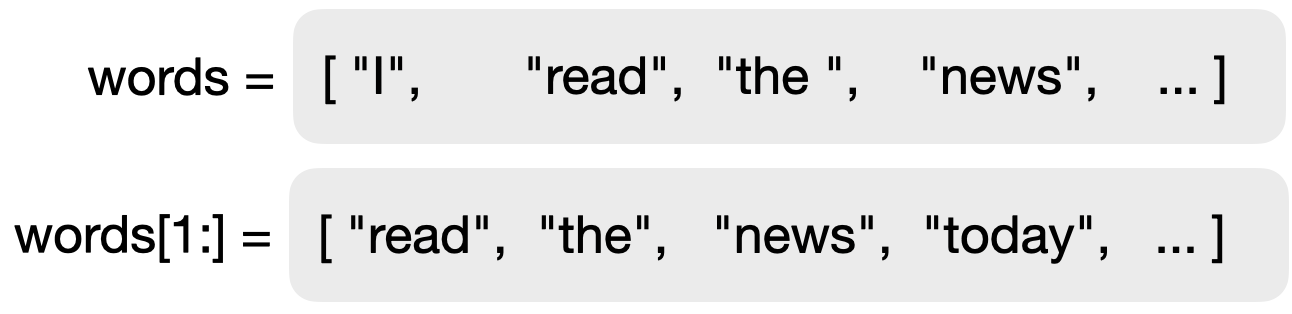
If we zip these two lists as we did previously, we will get our list of bigrams.
Exercise 4.4 In your program, implement the make_bigrams function. This function should take a text (a single string) as a parameter, and it should return a list of bigrams of that text.
Exercise 4.5 Test your function with a single sentence. Check whether the output is what you expected.
Exercise 4.6 Test your function with a long text, such as a whole book. A statement that reads in a book is provided in your starter project. You can enable it for this test.
Exercise 4.7 After your tests, you can remove the printing of the list of bigrams, but keep the list stored in a variable for further use.
The text that we use to create our bigrams is the training text. We can use different texts to train our system, leading to different output. If we train the text, for example, on Jane Austen books, our system will use the language of Jane Austen. If, on the other hand, we use scientific texts to train the system, it will use that vocabulary.
4.3. Predicting the next word
Now that we can generate a list of bigrams for any given text, we can use this list to predict the next word. The idea is now straightforward: First, we look at the previous word. From the list of bigrams, we select just those where the first word of the bigram matches our previous word. For example, if our previous word was "It", then the list of matching bigrams might start with
("It", "sets")
("It", "is")
("It", "seems")
("It", "is")
("It", "is")
("It", "has")
("It", "was")
("It", "is")
...
From this, we can make a list with all the second words, and then randomly select a word from that list. Since words that more frequently follow our previous word occur more often in that list, they will have a higher chance of being selected as our next word. In other words: the frequency of a word appearing as the second word in the training text determines its probability to be selected. (For predictive text, we would select the most frequent word. For creative writing, we will randomly select one of the list.)
Exercise 4.8 Make a new function with two parameters, called generate_next_word (prev_word, bigrams). The first parameter will receive the previous word, and the second the list of bigrams from our training text.
Exercise 4.9 In this function, create a new empty list called following, which will hold all the words that can follow the previous word (the second words from the matching bigrams). Then write a for-loop that iterates over the list of bigrams. Remember that the list contains pairs, so the loop should have two loop variables:
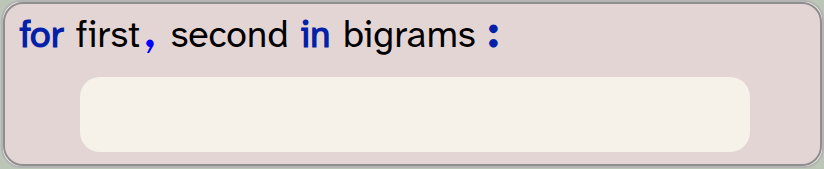
for first, second in bigrams:
    pass
Inside this loop, check whether the first word is the same as our previous word. If it is, add the second word of the bigram to the following list. For a first test, print the following list. Test it with several words as previous words. Does it look plausible?
Exercise 4.10 Extend your code so that your generate_next_word function randomly selects and returns a single word from the following list. Your project already contains an import statement for the random library. This library includes a function called choice, which takes a collection as a parameter and returns one randomly selected element. Thus, you can return a random word from your following list using this statement:
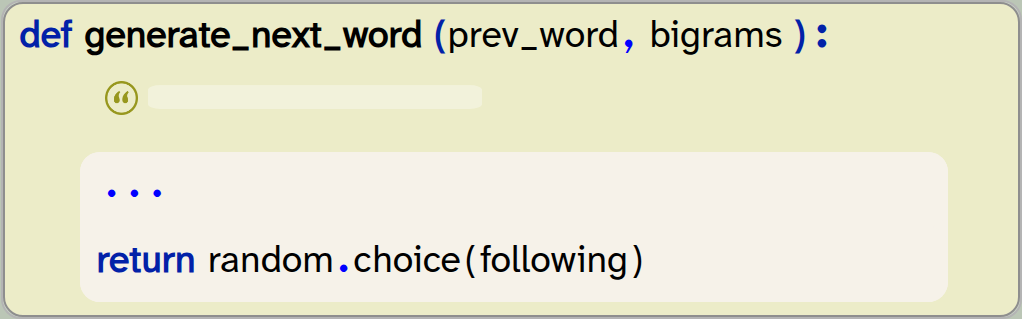
def generate_next_word (prev_word, bigrams):
    ...
    return random.choice(following)
Exercise 4.11 It is possible that the following list is empty, even after searching all the bigrams. In that case, the choice function will fail with an error: it cannot choose an element if there are no elements.
Extend your code so that it checks for this case, and returns any random second word from your bigrams if the following list is empty.
Exercise 4.12 Test your function first by calling it once with a given word and printing out the generated next word. Test multiple times with the same test word. Does it always return the same next word, or different ones? Explain what you observe. Then try it with different start words.
The choice(list) function from the random library randomly selects an element from the given list. Import random to use this function.
We have now reached a stage where we can give a word and a list of bigrams to our function, and it will return a plausible following word. It is plausible in the sense that there is at least one occasion in previous writing where this sequence of words appeared. While producing a single next word does not seem like much of an achievement, generalising this to produce longer text is now very straightforward.
4.4. Generating text
The only additional thing that is needed to go from generating a word to generating longer text is to do so repeatedly. If we put our call to generate the next word into a loop, and at each iteration take the previous word that was produced as the input word, we can generate sequences of text of arbitrary length.
Let us try that with the following exercises.
Exercise 4.13 Put your call to the generate_next_word function in a loop, so that it generates 50 words. At first, use the word "It" as the start word, and make sure that you use the generated word as the previous word in the next loop iteration. Print out each word as you run through the loop.
Exercise 4.14 Initially, your words may be printed on separate lines, one word per line. This is because the print function automatically ends each output with a line break. You can change this by specifying what should be printed at the end of the output by using the end parameter:

print(word, end=" ")In this example, we have specified that a space should be printed after each word instead of a line break, so all words will appear in the same line. Change your code to do the same.
The end parameter of the built-in print function determines what is printed after the output. The default value is a line break, but we can change this to other characters by setting this parameter.
A copy of the project with all this functionality implemented is in the book projects as text-generation-v2. Feel free to compare your own code to the one in that version.
4.5. Summary
So what have we achieved so far?
We can now read in a training text that generates a list of bigrams. The bigram-list is our "model" – this is what is used to generate text later on. We "train our model" by reading in text and generating the bigrams. The kind of text documents we train our model on determines the kind of language our system produces. If you train your model using a different text, it will produce different language. (Try it out!)
Of course, we could read in not just a single book, but a whole stack of books. The more text we use to train our model, the closer our system will follow normal English speech patterns.
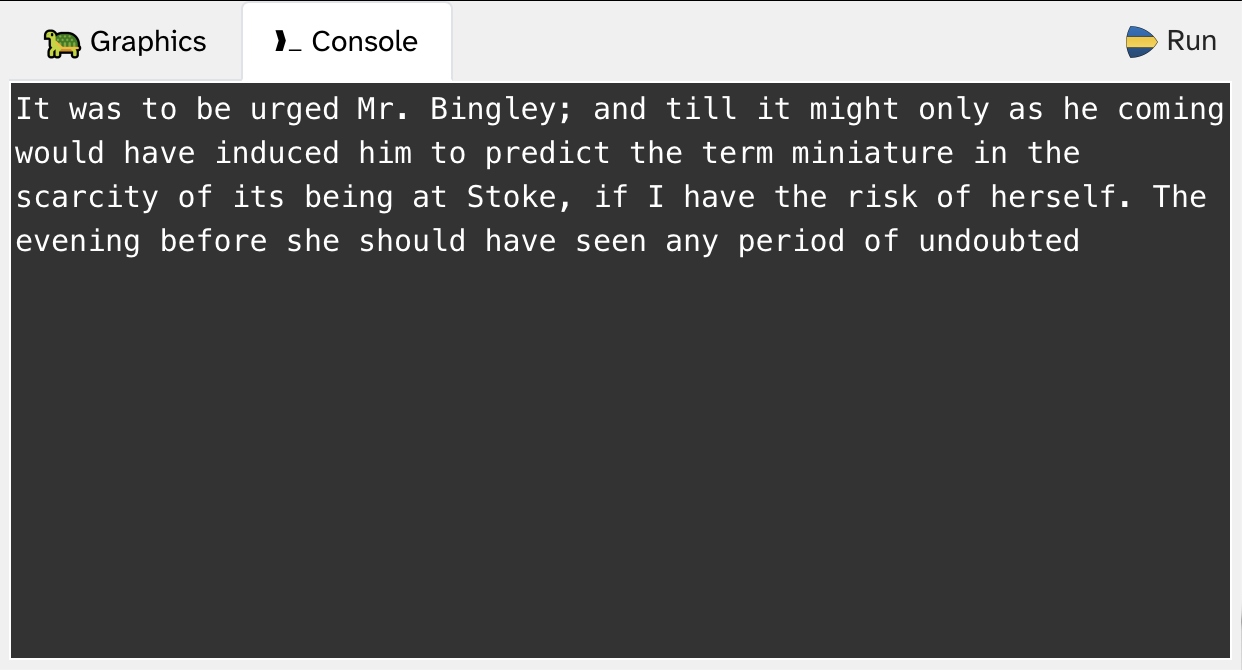
When we look at the output (for example, in Figure 4.10), we can see that the result so far is somewhat entertaining, but not very impressive. Very superficially, it looks like English, but there is no recognisable grammar, and this output is not fooling anyone. We will improve this in the next chapter.
Another observation is worth pointing out: This time, we have not stripped out punctuation when we split the text into words. As a result, punctuation is still included in the bigrams, and thus in the output. The words "it" and "it," are just considered different words, and handled separately, each with their own following words. This makes the resulting text look more natural.

-
A bigram is a pair of two adjacent elements from a list, such as two consecutive words in a text.
-
The zip function merges two lists into a single list of tuples, pairing the elements of each list.
-
The choice(list) function from the random library randomly selects an element from the given list. Import random to use this function.
-
The end parameter of the built-in print function determines what is printed after the output. The default value is a line break, but we can change this to other characters by setting this parameter.

Sentiment analysis
Another task that text analysis is used for is sentiment analysis. This is a technique to analyse how positive or negative the sentiment in a body of text is. This might be used by a company to monitor the comments or reviews left online for their products or services. Doing this, they might find out if customers are unhappy with their purchase. Another use might be for political parties which want to find out about the attitude of the population to a specific topic; again, this might involve analysing online comments.
Sentiment analysis is usually based on a simple idea: we just count how many negative words and how many positive words are used in a text.
The project sentiment-analysis does just that: it loads a large dictionary in which words are annotated with various characteristics, including information whether they have positive or negative connotations. From this, it builds a list of positive words and a list of negative words.
In its current form, it does not do anything very interesting with it – it just counts positive and negative words in a given text.
You could extend this project in various ways: You could run the sentiment analysis separately for each chapter of a book, to investigate the dramatic arc of a story. Do this with "Frankenstein" or with "Pride and Prejudice", and see how the tension changes during the storytelling. You could even plot the arc as a graph. Another possibility is to find reviews of films or products and run the analysis on those. Have a go and decide how you want to present the sentiment.