Chapter 1. Thematic text analysis
We will start our journey through the projects in this book by looking at analysing documents. What is a document about? Can we find out without having to read it all? Can we get a sense of its content programmatically?
If you have read Volume 2 of this book series (Working with data), then you know that we already started to look at text analysis there. However, in that volume, we looked at purely numeric analysis: We counted how many characters a text consists of, how many words and sentences were in a book, and so on. This statistical data allowed us, for example, to calculate a reading ease score.
One severe limitation in that analysis, however, was that it looked purely at numbers – statistics about the text – but not at the content of the text. It did not matter what the words were, or what the text was about.
In this project, we will go a little deeper into analysing a text by looking at the actual words being used: we will look at thematic analysis.
We will see that a very simple idea can give us a reasonable sense of what a text is about: We can find out which words are being used much more than we would expect from an average text, and these frequently used words can give us a hint at the theme of the document.
This approach can also be taken further: We can build on this and use a similar idea not to analyse, but to generate text. This may be used to predict the next word in a sentence, as is sometimes done in phone messaging applications, or even to generate entire sentences or documents, as Large Language Models (LLMs) do. We will look at this in later chapters of this book; first, we will concentrate on analysing the contents of a document.
Previously, for the numerical analysis of text, we have made extensive use of Python’s list class. We have worked with lists of words, lists of numbers and lists of other types. For the discussion here, we assume that you are somewhat familiar with working with lists.
To enable us to do our thematic analysis, we will have to use several other data structures, and you will learn what they are and how to use them in the course of this project.
 Thematic text analysis is analysis of the content of a body of text. It may look at the topics discussed in a text, or it may involve sentiment analysis (for example of online comments) to investigate the ratio of positive to negative comments.
1.1. Thematic analysis
As mentioned above, our plan to do a thematic analysis rests on the idea of finding out which words are used unusually often in a given text.
This does not mean that a word is used more often than another word in a given text – that is entirely expected. Some words just occur more frequently than others: words like "the" or "go" are very frequent. To give us some useful information, we need to find out which words are used more often than we would expect them in an average English language text. For example, if the word "crime" is used more often than expected in a book, that tells us it is probably a detective novel. In that way, we can find out what the document is likely talking about.
This means we can achieve our content analysis in these three steps:
-
First, we count how often each word is used in our text.
-
Secondly, we compare the frequency of each word that was used with the frequency we would expect in an average English text.
-
And thirdly, we find the most-overused words – the ones that were used much more than expected – and print them out.
We will look at these three steps one at a time. We start at the beginning: counting how often each word is used in a text. This is also known as the frequency of the word.
1.2. Word frequency
To start this task, we have prepared a starter project named thematic-analysis-v1, which you can find in the book projects. This project includes only two helper functions which we will use later, but no code to help us with the initial task.
Whenever we aim to implement a solution for a sub-task, it is useful to use functions in our programs to provide the sub-task functionality. So this time, we will start by writing a function to count the frequency of a given word in a text.
Exercise 1.1 Open the thematic-analysis-v1 project. (If you are reading on screen, clicking on the project name in the previous sentence should open the project. If you are reading on paper, open Strype, and then find the project in the "Book…" section in the Strype menu.) In this project, add a new function named count_word with two parameters: count_word (search_word, text). Both parameters are strings. The purpose of this function is to count how often the word search_word appears in the text text. Initially, leave the body empty, but write a comment describing what the function will do.
Exercise 1.2 Start implementing the function: Split the text into a list of words and store this list in a variable named words. (If you are not sure how to do this, have a look at the split() method of the String class.)
Exercise 1.3 Test your code so far. Do this by printing out your words list inside the count_word function, and adding a test call to this function in the My code section. If all went well, your program should print out a list of all words in the second parameter.
Exercise 1.4 Once you have convinced yourself that the word-splitting works, remove the print statement again. Instead, add a loop to count how often search_word appears in your words list. Remember, you can check whether a given word is the search-word by using the double-equal sign:
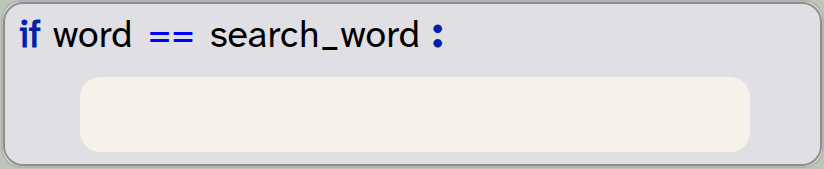
if word == search_word:
    pass
You will need to use a variable to do the counting.
Exercise 1.5 Return the correct count from your function. That is: your function should return the number of times the search word was found (an integer). Adapt your test code accordingly to receive and print out the result.
Exercise 1.6 Your function should now work. Test your function with different data (different search-words and different sentences). Does your function work correctly?
The word frequency is the number of times a given word is used in a text. It may be expressed as a count, or as a percentage of the words in the text.
1.3. Cleaning the data
If you have reached this stage in the project, you will have seen that we can now count the frequency of a given word in a text. You may have noticed, however, that some problems remain that can result in incorrect counting. If not, you should be able to see the problem with the following exercises.
Exercise 1.7 Test your function with the search-word "say" and the text "You say Yes I say No You say Stop and I say Go go go". Then test it with the search-word "go" and the same text. What do you observe?
Why does the test work correctly for the word "say", but not for the word "go"? You have probably worked out that this is because of the uppercase character in one of the "Go" occurrences in the text.
For our purposes, we do not care about the upper- or lowercase nature of the words – we would like to count them in any case. We can easily achieve this by first converting our entire text to lowercase before starting our counting:

text = text.lower()The lower() method is a built-in method of the string class that returns a new string with all characters converted to lowercase. Note that it does not modify the original string. Thus, we have to assign the result back to our string if we want to keep it.
Exercise 1.8 Look up the documentation for the string method lower(). (You can do this by doing a web search for "Python string lower".) What will happen with numbers in the string?
Exercise 1.9 Research the methods provided in Python for the string class. How many methods are there? What is the name of the method you could use to check whether a string consists only of a number?
Exercise 1.10 What does the string’s count() method do?
With these exercises, you will have discovered two things: First, there are many useful string methods available which can save us a lot of work of writing code ourselves. Knowing what methods are available is important to becoming a good programmer. You do not need to memorise all methods, but you should have a link to the documentation page readily available when you work, so that you can look them up whenever you need them.
And secondly, we can see that a count method is available that is somewhat similar to the count_word function we are currently writing. The reason we are writing our own is two-fold: The built-in count method does not find words, but substrings. Thus, "car", for example, would also be found if the actual word is "scarlet". Also important is our goal to modify and extend this function to count not one word, but all words (and there is no ready-made method for this). So our counting function is a stepping stone for more powerful functionality.
The Python string class has many ready-made library methods that provide useful functionality. It is useful to be familiar with these methods, and to look them up whenever you need to manipulate strings.
Exercise 1.11 Modify your count_word function so that it converts the text to lowercase before searching. Run your test again. Make sure that the last test case given in the earlier exercise returns 3.
Exercise 1.12 Run another test: Count the occurrences of the word "say" in the string "You say, Yes, I say, No. You say, Stop and I say, Go, go, go"
Again, you may have noticed that your function does not count correctly. This time, it is the punctuation characters that are throwing a spanner in the works. When we split the text, we separate the original string at space characters, but all other characters are left in the words. Thus, our list of words contains the word "say," (including the comma), instead of the word "say".
To fix this, we will need to remove the punctuation characters from each word.
Exercise 1.13 Research the strip() method of Python’s string class. What does it do? What are its parameters?
Exercise 1.14 Consider the statement

word = word.strip(string.punctuation)What does this line do? How does it work? What does string.punctuation refer to? What do you have to import to make this work?
Exercise 1.15 Modify your function to strip punctuation characters from the words before comparing them. Test your function again. Make sure all words are now correctly found, even if the original text includes punctuation.
What we have done in these exercises is to "clean the data". Cleaning the data for processing means to get all data into a known standard format so that it is properly recognised by our program. (In other data sets, it might also mean to remove invalid or duplicate data, but this is not a problem in our case.)
Our program deals with text, so the data points are words. But the words can appear in different formats and contexts. Consider, for example, the following strings, which may all be produced as a "word" by the string split() function:
hello
"hello"
Hello
HELLO
hello.
Without cleaning, these would all be treated as different words, because they are different strings. We want, however, to recognise all of them as the word "hello", so we "clean" the string to produce the canonical (standard) representation. In our case, we do this by converting to lower case and removing punctuation, so that we are left with the string "hello" in each case. Then we are ready to count the words.
When we want to process data, the data is often not in a consistent format. To process it effectively, data often has to be converted to a known ("canonical") form. This may include consistent formatting, removing of duplicates and removal of invalid data. This is known as "cleaning the data".
1.4. Working with files
Counting words in single sentences is not very interesting – we could do that by hand. But counting words in long documents is not so easily done; this is where a computer can help. Let us try that out.
Strype includes various text files in its built-in file system. You can see the file system, and the files available within it, by using the "Files" tab in the bottom right of the Strype interface (Figure 1.1).
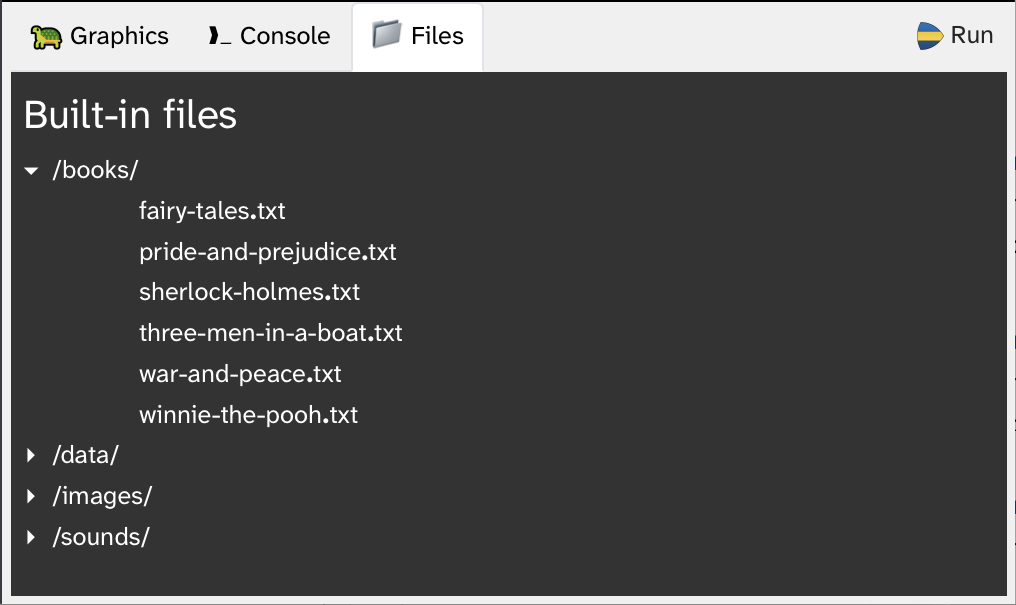
By browsing the built-in files, you can see that there is, for example, a file named "winnie-the-pooh.txt". This is the full text of A. A. Milne’s children’s book "Winnie The Pooh". In this book is a character called "Piglet". Let us find out how often Piglet is mentioned in the book.
Your project includes a read_file function that can be used to read in the contents of a text file. When you call this function, and you place the text cursor inside a string parameter (between the quotes), you can use auto-completion (Ctrl-Space) to pop up a list and select from all the available files (Figure 1.2).
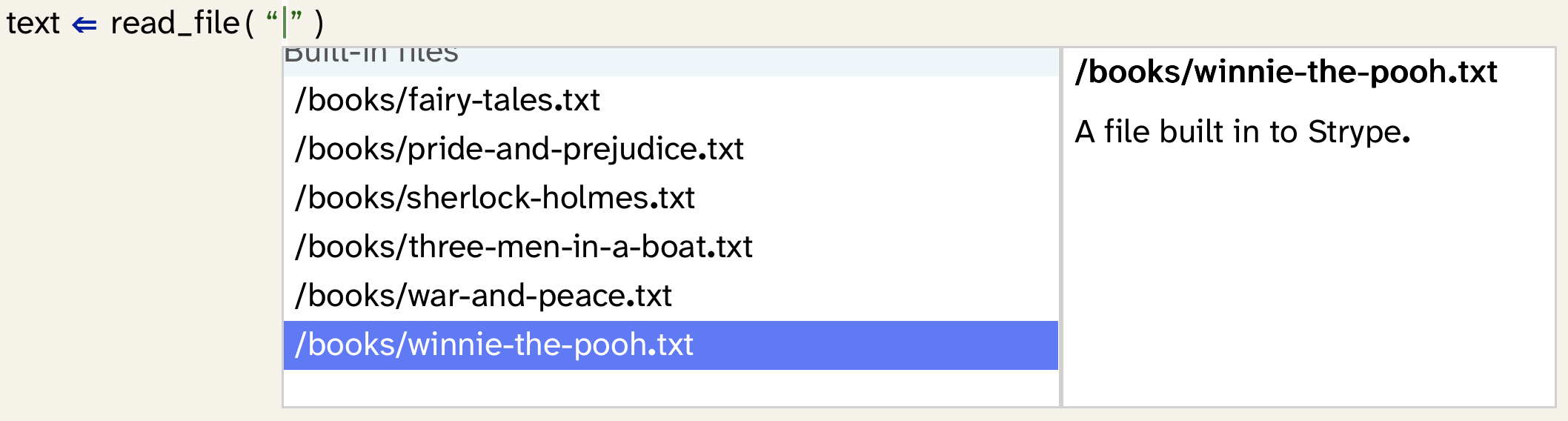
You can now use this read_file function to read in the text of the Winnie The Pooh book, and then pass the text to your count_word function to count the number of times "piglet" is mentioned in the text.

You can use auto-completion for strings. The auto-complete popup will offer files available in Strype’s file system. To find a file, type any part of its name. For example, typing "wav" will find all wav-format audio files, or typing "csv" will list all csv-files.
Exercise 1.16 Find out how often Piglet is mentioned in the Winnie The Pooh book. Find out how often "Eeyore" is mentioned. (Eeyore is another character in this book – you can do a web search to see a picture.)
A project with the functionality discussed so far is available in the book projects as thematic-analysis-v2. If you are unsure about any of your own code, you can compare your project to this one.
Exercise 1.17 Use a text file of your own, such as your last essay or report that you wrote for your school work. Open it in your text processor and make sure to save it as "Plain text", using the word processor’s "Save As" function. Then use this plain text file, upload it to the Strype "Local files" area, and count one of the words within it.
Working with data files in Strype
Appendix B: Working with data files explains how you can work with data files. There are various options, including accessing data files from the built-in file system or from a cloud file system. For our purpose here, read about how you can upload your own files to Strype’s "Local file" area. Understanding the Strype file system will allow you to use your own files for the exercises, which can make them more interesting.
1.5. Summary
Let us pause for a moment and take stock of what we have achieved so far. We can now count the number of occurrences of a given word in any given text. We do this ignoring the case of the letters, and we can ignore punctuation characters. That is a good start. But a major problem remains: We would like to count all the words in a text, not only one given word. We know from previous chapters that we can hold a count in a variable, but the challenge here is that we need a separate count for each different word in the text.
It is not feasible to create a separate variable for each word. There may be thousands of different words, and we do not know in advance how many variables we would need. A list is also not directly suitable because we need to hold two pieces of information, the word and its count, together.
The solution to this problem lies in a new data structure: a dictionary. In the next chapter, we discuss what a dictionary is, how we use it, and how it can help us to solve this problem.

-
Thematic text analysis is analysis of the content of a body of text. It may look at the topics discussed in a text, or it may involve sentiment analysis (for example of online comments) to investigate the ratio of positive to negative comments.
-
The word frequency is the number of times a given word is used in a text. It may be expressed as a count, or as a percentage of the words in the text.
-
The Python string class has many ready-made library methods that provide useful functionality. It is useful to be familiar with these methods, and to look them up whenever you need to manipulate strings.
-
When we want to process data, the data is often not in a consistent format. To process it effectively, data often has to be converted to a known ("canonical") form. This may include consistent formatting, removing of duplicates and removal of invalid data. This is known as "cleaning the data".